Can HR Software Integrate With Payroll Systems? How It Works
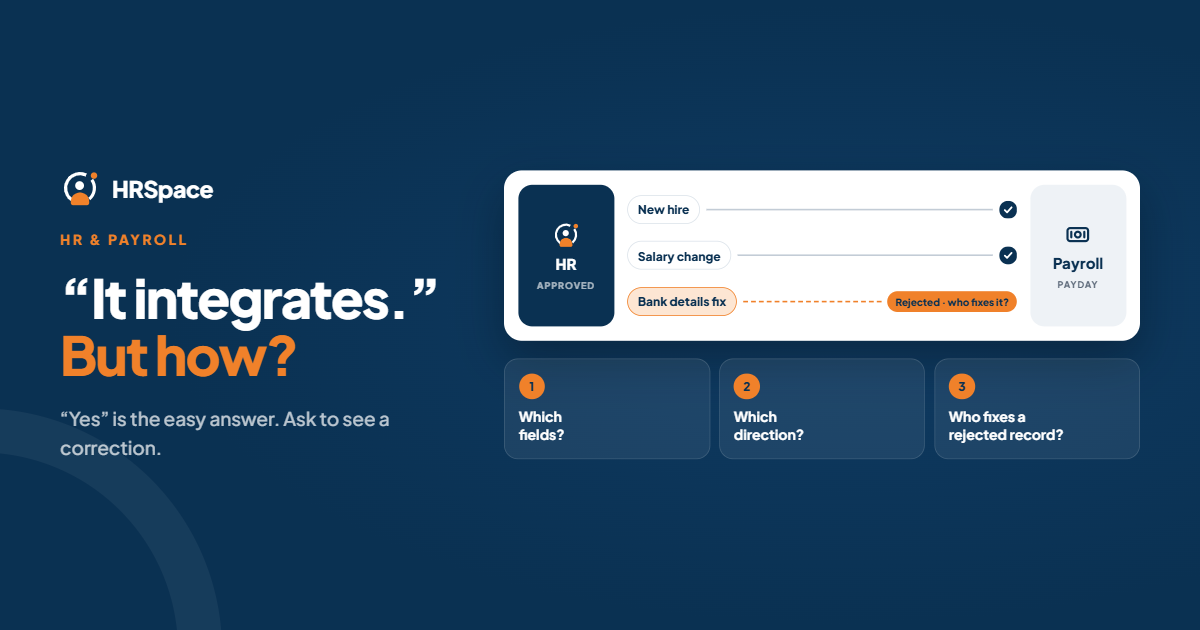
Yes. HR software can connect to payroll in four ways: a ready-made connector, an API, a middleware tool, or a file transfer. What matters is not whether a connection exists, but what it carries, which way the data flows and who is responsible when it fails.
This guide explains each method, the data involved, where connections break, and what to ask before you buy. It also explains where HRSpace fits: HRSpace is HR software that works alongside your payroll provider. It doesn’t run payroll itself.
The four ways to connect
| Method | How it works | Best for | Watch out for |
|---|---|---|---|
| Native integration | The vendors provide a ready-made connection | Common HR and payroll pairings | May not sync every field, and quality varies |
| API | Systems exchange data directly | Custom or complex workflows | Needs technical ownership and maintenance |
| Middleware | A third-party tool connects the systems | Companies using several apps | Adds another tool to manage |
| File transfer (CSV or SFTP) | One system exports, the other imports | Simple one-way feeds, or systems without APIs | Not real time; errors and repeat imports need controls |
None is automatically better. A file transfer with a clear review step can be safer than an API nobody maintains.
What data moves
Think in terms of events:
- New hire: name, role, start date, manager, and the details payroll needs.
- Change: a salary change, new role, or department move, with an effective date.
- Time and leave: approved hours and absences that affect pay.
- Leaver: the end date, so nobody is paid after they go.
Also decide the direction. Payroll often only needs approved HR data one way. Return flows, such as payroll results coming back to HR, need a clear purpose and an owner.
Decide who owns what
Name the authoritative system for each kind of information before you connect anything. A typical split:
- HR system: employee status, role and compensation records.
- Time tracking or HR leave: approved hours and absences.
- Payroll: wage and tax calculations.
- Accounting: financial reporting structure.
An approved change is different from an entered one. A new salary shouldn’t reach payroll until someone has approved it and its effective date is clear.
Where it goes wrong
- Partial coverage. The connector moves names and emails but not compensation or leave.
- Matching the wrong person. Use unique identifiers, not names.
- Timing. Overnight batches can miss a change made just before payroll closes.
- Repeated sends. A second import creates duplicates or double changes.
- Silent failures. A “sent” status doesn’t prove payroll accepted the right values.
- Corrections. An amendment after transfer is where many processes break.
Test the handoff
Use a test environment or vendor-supported testing, never live data first.
- Define ownership and approvals.
- Map the fields, including formats, identifiers and effective dates.
- Test the events you handle: a new hire, an update to an existing employee, a leaver.
- Test exceptions: a missing field, a rejected record, a repeat submission.
- Test a correction. What happens when an approved change must be amended after transfer?
- Agree recovery steps and a named monitor.
Check that the receiving system accepted the intended values, not just that something was sent.
What to ask a vendor
- Which exact payroll products and configurations are supported?
- Which fields transfer, and which stay manual?
- What triggers a transfer, and what approval comes first?
- How do HR and payroll see rejected records?
- What prevents repeat transfers from creating changes?
- Who maintains the connection when either system changes?
Get the answers in writing. A demo isn’t a scope.
One system or two?
Some platforms combine HR and payroll, so the “integration” is internal. That removes sync lag but ties you to one vendor’s payroll. Others keep them separate, which gives you choice but needs a handoff. Neither wins in general. It depends on whether you’re happy with your payroll provider and how much you need the HR side to be strong.
How HRSpace fits
HRSpace doesn’t process payroll. It’s HR software for onboarding, time off, timesheets, reviews, recognition, recruiting and employee requests, and it works alongside your payroll provider or accountant.
The benefit is on the HR side of the handoff. When records, approved leave and timesheets sit in one place, with a named approver for each change, payroll gets clean, approved information, and a short, reviewable step instead of retyping from several spreadsheets.
Before you commit, ask HRSpace for the current list of supported payroll connections and export options for your payroll provider, and test the events above in the free trial.
What it costs
HRSpace charges $1 per employee per month for its base layer (records, documents, time off and timesheets) and $0.50 to $1 per module, billed monthly, with a 14-day free trial and no credit card. Payroll is separate, so budget for your payroll provider on top.
Frequently asked questions
Can HR software integrate with payroll?
Yes, through native connectors, APIs, middleware or file transfers. Check the exact systems, fields and direction.
Does an integration mean automatic sync?
Not always. Check whether transfers are real time, scheduled or manual, and what approval comes first.
Can I keep my payroll provider if I change HR software?
Yes, if the HR software supports a suitable handoff. Test the events you need before you switch.
Is an API better than a CSV file?
Not necessarily. Choose what meets your needs and what your team can maintain and recover.
Does HRSpace do payroll?
No. HRSpace works alongside your payroll provider.
Can I try HRSpace before buying?
Yes, with a 14-day free trial and no credit card.
One last thing
Test a correction, not just a new record. It shows who owns the change, what the effective date is and how you recover.
Where to go from here
To see how your HR data would look before it goes to payroll, start a free 14-day HRSpace trial. You may also like our comparisons with Payescape and Workplace HCM, and our pricing guide.
Ready to make HR the easy part?
Explore modular pricing and start a free 14-day trial.