What an AI HR assistant can and can't do
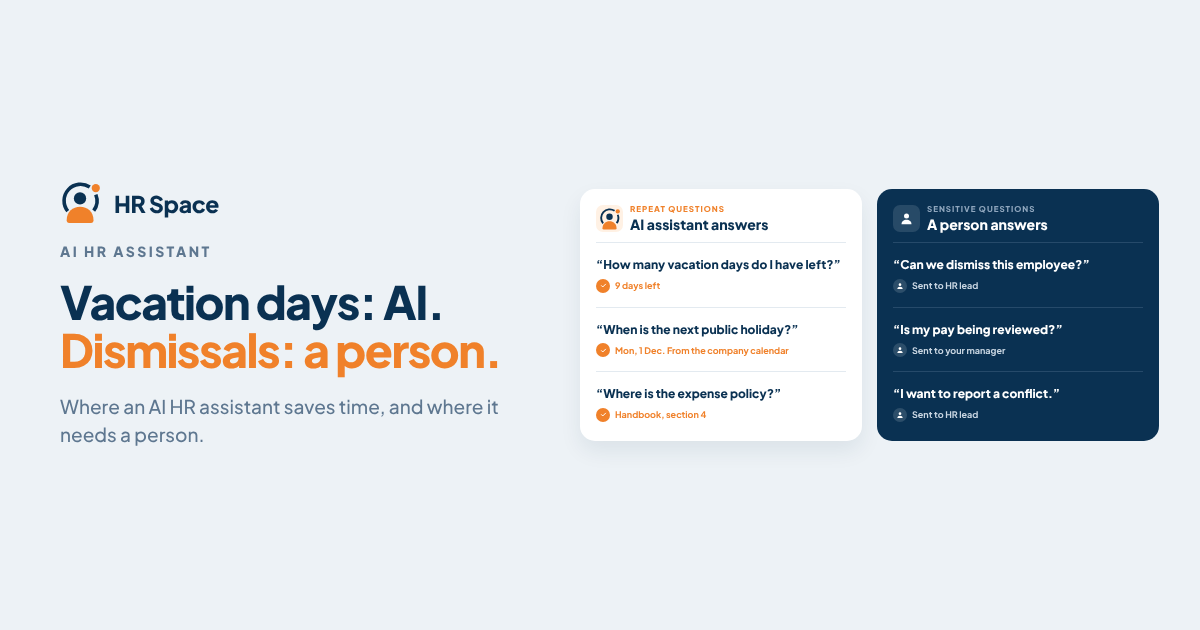
"How many vacation days do I have left?" "Who approves my expense?" "Where's the remote work policy?" Most HR inboxes are full of questions that already have an answer somewhere. An AI HR assistant promises to find that answer in seconds. Sometimes it does. Sometimes it confidently invents one.
Quick answer: An AI HR assistant is good at finding and summarising information that already exists in your HR system: balances, policies, schedules, who owns what, what changed this week. It is not reliable on its own for anything that needs judgement, local legal knowledge or sensitive context: pay, discipline, health, dismissals. The useful test is simple: run your own real questions through it and check every answer against the source.
What an AI HR assistant does well
|
Task |
Good fit? |
What to watch |
|---|---|---|
|
"How much leave do I have?" |
Yes |
Only if it reads live balances, not a copy |
|
"What does our policy say about remote work?" |
Yes |
It should point to the handbook section it used |
|
"Who is off next week in my team?" |
Yes |
Respect who is allowed to see whose absences |
|
Summarising a candidate pipeline or a week of check-ins |
Yes |
A summary is a starting point, not a verdict |
|
Drafting a job advert or onboarding checklist |
Yes, as a draft |
A person edits before it goes out |
|
"Is this person eligible for a raise?" |
No |
Needs judgement and context the data doesn't hold |
|
"Can we dismiss someone for this?" |
No |
Legal question; local law and advice required |
|
Anything about health, complaints or investigations |
No |
Sensitive data and a duty of care |
Where it shouldn't be trusted alone
When the answer isn't in your data. If your handbook doesn't cover a situation, a general AI model may fill the gap with what is typical elsewhere. That answer can sound right and still be wrong for your company or country.
When the question is really a decision. "Should we approve this leave during the release week?" is a manager's call. The assistant can show the calendar and workload; it shouldn't make the decision.
When the data is messy. An assistant is only as good as the records it reads. Duplicate employees, out-of-date policies or leave tracked half in a spreadsheet will produce confident, wrong answers.
When people can see more than they should. An assistant that can read every record will happily answer a question the user shouldn't be able to ask. Access has to follow the same permissions as the HR system. Our guide to connecting HR data to AI tools via MCP covers this in detail.
A 10-question test before you buy
Pick ten questions people actually asked HR last month. Include a mix:
- Three balance or schedule questions ("How many days do I have left?")
- Three policy questions with a clear answer in your handbook
- One policy question your handbook doesn't answer
- One question the user shouldn't be allowed to see the answer to
- One summary task ("What changed in the hiring pipeline this week?")
- One question that needs a decision, not information
For each answer, check three things: is it correct, does it show where it came from, and does it say "I don't know" or hand over to a person when it should? Questions 3, 4 and 6 matter most. A good assistant declines or redirects them. A risky one answers anyway.
How to roll one out without creating new problems
- Clean the sources first: update the handbook and fix leave balances before switching the assistant on.
- Start with employees' own data and public policy, then widen to manager summaries.
- Give people a clear route to a human, for example a request in your internal service desk, when the assistant can't help.
- Measure what matters: fewer repeated questions to HR, and how often answers had to be corrected. Our article on how much time HR software saves per week explains how to measure this honestly.
How HRSpace's AI assistant fits in
HRSpace includes an AI assistant, Nola, that lets people chat with their HR data inside the platform. Because time off, the calendar, the handbook, goals, projects and recruiting already live in HRSpace, the assistant works from the same live records your team uses, not from an exported copy.
That solves the two problems that make most assistants unreliable: scattered data and answers with no source. When a question needs a person, HRSpace's internal service desk, Service Me, routes it to the right owner with a clear status. Teams that want to use their own AI tools can also connect through MCP or the API.
The AI Assistant is a $0.50 per employee per month add-on to the $1 Base Layer. The easiest way to judge it is to run the 10-question test above during the 14-day free trial.
FAQs
What is an AI HR assistant? A chat tool that answers employees' and managers' HR questions using the company's HR data and policies, and can summarise or draft HR content.
Can an AI HR assistant replace HR staff? No. It can take repetitive questions off HR's plate. Judgement, sensitive cases and decisions stay with people.
Is an AI HR assistant accurate? It is accurate when the answer exists in clean, current data and it shows its source. Accuracy drops when it has to guess.
Can employees ask it about other people's data? They shouldn't be able to. Access should follow the same permissions as the HR system itself.
Does it work for small companies? Yes, and often the gain is bigger: one HR person or office manager answers fewer repeated questions.
Further reading: Can an Employee Self-Service Portal Reduce HR Ticket Volume? · Introducing Service Me
Ready to make HR the easy part?
Explore modular pricing and start a free 14-day trial.