Timesheets That Help Small Teams Understand Project Effort
Explain the decision the timesheet supports
Tell the team why the information is being recorded. You may need it for project planning, internal allocation, client reporting, or another approved business process. Different purposes can require different levels of detail.
Identify which records feed another system or a commercial process. Confirm the relevant requirements with the person responsible rather than assuming a general project-time entry is ready for every downstream use.
Explain who reviews the entries and what happens when something needs correction. Employees should know how to ask a question about categorization or missing context.
Keep the purpose practical. A timesheet routine is easier to use when people understand how accurate information improves estimates, makes added work visible, or supports an agreed report.
Create categories people can apply consistently
Use project and task names that match the way the team talks about the work. If two categories overlap, give an example showing where a typical activity belongs.
Include an appropriate place for internal work such as planning, review, coordination, or training where it is relevant to your process. Forcing everything into a client-delivery category can make the final report difficult to interpret.
Clockify's time-tracking guidance emphasizes an organized time log and clear tracking practices. The principle applies before choosing any particular tool: a record needs a consistent structure if the team expects to compare it later.
Review the categories after the first week. If colleagues repeatedly ask where to place the same activity, improve the definitions rather than leaving each person to invent an answer.
Keep the entry short and meaningful
|
Entry element |
Information to record |
Review question |
|
Project |
The workstream receiving the effort |
Is the allocation correct |
|
Activity |
The task or relevant type of work |
Can the reviewer understand what was supported |
|
Duration |
Time recorded using the agreed method |
Does the entry need clarification |
|
Context |
Material revision or changed requirement |
What explains a difference from the plan |
|
Review status |
Submitted, queried, or approved |
Who owns the next action |
Use only the fields your process needs. A concise record that people can complete accurately is more useful than a detailed form filled with repeated generic text.
Record work close enough to remember it
Agree on a routine that fits the team's working pattern. Leaving every entry until much later can make it harder to separate activities or remember a change to the brief.
Choose a method the team can apply reliably, whether it involves timed work, manual entries, or a combination supported by the proposed system. Explain how to handle an interruption or a forgotten entry.
If someone is reconstructing time, use the organization's agreed correction approach. Do not turn an uncertain recollection into a precise-looking record without acknowledging the context where it matters.
Keep the process workable for varied responsibilities. A colleague moving between support and planned delivery may need a different entry routine from someone completing a long, uninterrupted task.
Review entries to understand differences
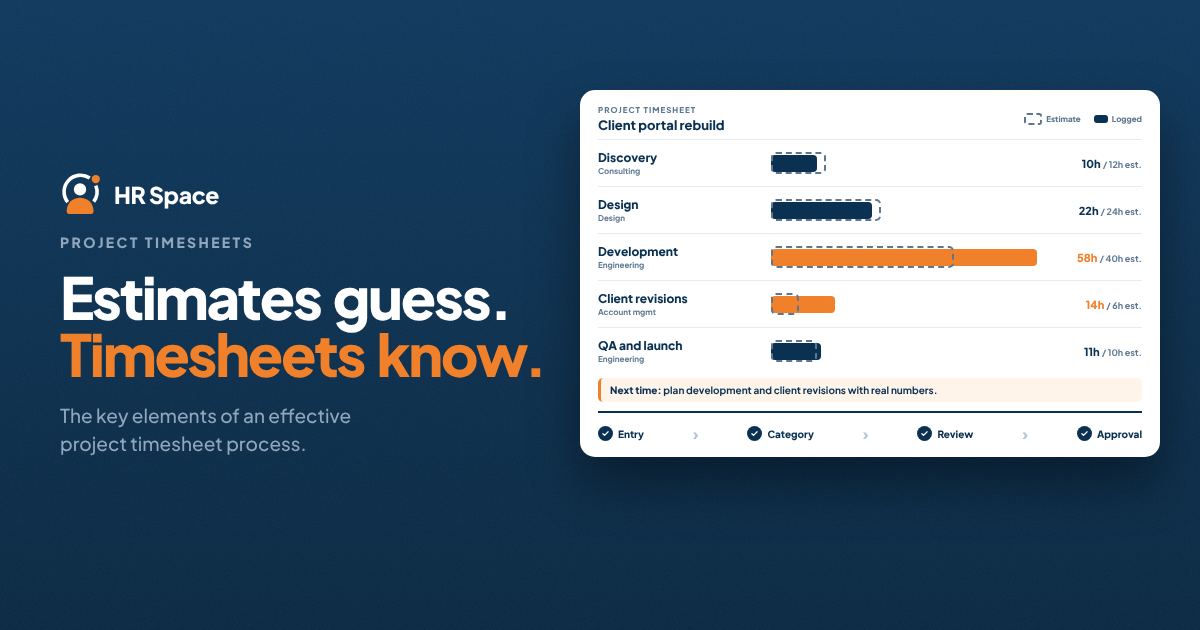
Compare the record with the task, estimate, and relevant changes. If the time is higher than expected, ask whether the work expanded, additional review was needed, or a dependency created rework.
Avoid approving a total while ignoring an obvious category problem. Correcting allocation now can prevent the team from planning the next project using a misleading picture of effort.
Return a query with a specific question. “Please clarify which revision this supported” is easier to act on than “incorrect.” Give the employee a route to respond and identify who approves the corrected version.
Where the record feeds client reporting or another formal process, use the authorized review rules. Keep a project-planning discussion distinct from any separate commercial or payroll decision.
Use the pattern to improve the next estimate
Look at recurring types of work rather than treating every variance as a separate failure. Perhaps review consistently needs more time, or a category of client change is missing from the initial plan.
Discuss the context with the people who did the work. A report may show the pattern, while the team can explain the constraint that produced it.
HRSpace describes logging hours against projects and reviewing and approving timesheets. Ask to demonstrate one ordinary entry, a queried record, and the way an approved total supports your intended report.
Choose one planning improvement you can apply to the next project. Keep the original estimate and the actual record understandable so later comparisons describe the same scope.
FAQs
How detailed should a timesheet be
Record enough to support the stated business purpose and required review. Clear project allocation, activity, duration, and material context are a useful starting point. Avoid asking for detail that nobody needs or uses.
What if employees categorize the same work differently
Clarify the definitions and provide a typical example. Review whether categories overlap or whether a relevant activity is missing. Resolve the structure before relying on comparisons between people or projects.
What should happen when an entry needs correction
Give a specific query and a clear route to respond. Follow the agreed review process and preserve the relevant correction context. Confirm which record is approved before it is used downstream.
Can project time improve estimates
It can inform planning when the categories and scope are consistent. Review differences with the team and identify recurring work omitted from earlier estimates. Keep changed requirements visible so the comparison remains meaningful.
Review one entry from last week
Could a colleague explain which work it supported and whether the plan changed? Explore HRSpace with a sample project and ask to follow the timesheet from entry through review.
Further reading
Ready to make HR the easy part?
Explore modular pricing and start a free 14-day trial.