Small Business Career Pages That Help Candidates Understand the Job
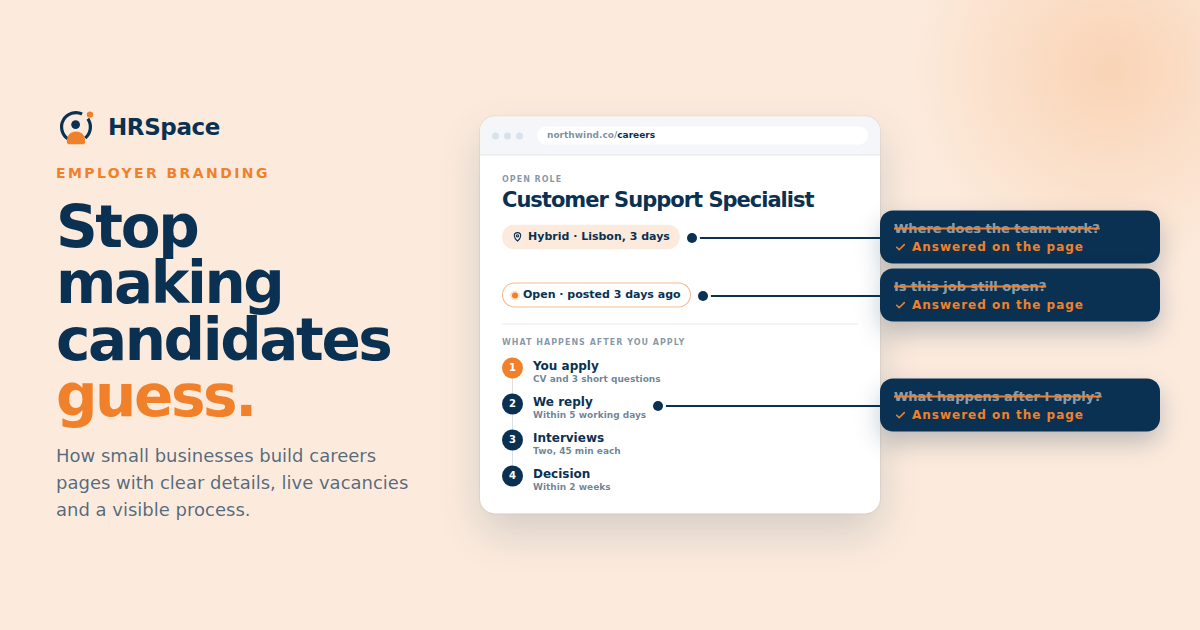
Someone hears about your company, opens the careers page on their phone, and finds a paragraph about your values followed by a list of job titles. They still do not know where the team works, what happens after applying, or whether the vacancy is current.
A small business career page should answer those practical questions. Candidates can then decide whether to read the role, apply, or come back another time with a clearer understanding of the company.
You do not need a large employer branding project to improve it. Accurate vacancies, understandable working details, and an application route that works will often give the hiring team a better starting point than a page full of broad promises.
Start with the questions a candidate needs answered
Read the page as someone who knows little about the business. What does the company do? Which roles are open? Where would this person work? What should they expect from the application process?
Answer those questions before adding more background. A candidate considering an operations role may care about shifts and location more than a long company history. Someone considering a remote role may need to know whether hiring is limited to particular locations.
Ask people who joined recently which details they had to find elsewhere. Their answers can help you identify gaps in the page without guessing what every candidate wants to know.
Give the company description some substance
Explain the business and the work in ordinary language. “We build appointment software for independent clinics” tells a reader more than “We are transforming the future through innovation.”
Describe how the relevant team operates. If managers work closely with a small product team, say what that means in practice. If a role includes regular customer visits, make that visible in the listing.
Use examples your company can support. Avoid promising rapid progression, unlimited flexibility, or a particular culture unless the hiring team can explain what a new employee will actually experience. A page should set expectations the team can meet.
Make vacancies easy to distinguish
Give each opening a clear title, location or working arrangement, and a route to the complete description. If several roles have similar names, include enough context to tell them apart.
Review whether every listed role is genuinely open. A vacancy left on the page after hiring has finished can lead to applications nobody expects to review. If the company accepts general interest, label that separately from an active opening.
Assign an owner for updating the listings. The person closing a role in the recruitment process should know how the public listing is updated and check that the change has appeared.
|
Page element |
Candidate question it answers |
Maintenance check |
|
Company description |
What does this business do |
Wording reflects the current business |
|
Open role list |
What can I apply for now |
Closed roles are removed or clearly marked |
|
Location and arrangement |
Where and how would I work |
Details match the current brief |
|
Role description |
What would I be responsible for |
Requirements and terms are approved |
|
Process information |
What happens after I apply |
Stages and expectations are current |
|
Application route |
How do I send my information |
Link and form work on common devices |
|
Contact or support route |
How do I ask for help |
Someone monitors the route |
Explain the hiring process in plain language
Give candidates a realistic outline of the process. If there is an initial conversation and a role interview, say so. If an assessment is involved, describe its purpose and when the candidate will learn the details.
Avoid publishing a fixed response promise the team cannot consistently support. An honest explanation of how updates are handled is better than a confident deadline nobody owns.
Include a way to ask about the process or request help taking part. Check that the contact route works and that the person receiving messages knows how to respond. A support address that nobody checks does not solve the problem.
Keep application instructions close to the role
Candidates should not have to search several pages to learn which documents or information you want. State the essentials beside the application route.
If a CV is enough to start, do not suggest that a cover letter is mandatory. If you ask for a work sample, explain the relevant format and what the team will review. Clear instructions reduce avoidable exchanges after submission.
Give the person a visible confirmation when the application succeeds. If the form has an error, explain what they need to correct without making them guess which field caused it. Check this behavior as part of the page review, not only the appearance of the page itself.
Test the page on a phone
Open a vacancy on a small screen and complete the path to submission using a test record. Look for hidden buttons, difficult navigation, text that requires zooming, and fields that are awkward to complete.
Check file upload behavior too. A candidate may be using a document stored on their phone or in a cloud folder. The accepted formats and size limits should be visible before they encounter a failed upload.
Ask someone outside the hiring team to try the same route. Familiarity can hide problems because the team already knows where the button is and what the field labels mean.
Use testimonials and photographs accurately
Employee comments and team photographs can help people picture the company. Use real material with the appropriate permission and enough context to understand it.
A comment from one person describes their experience. Do not expand it into a promise that every role will work the same way. Likewise, a photograph of a company event does not explain a normal working week.
Practical details still need their own place. A warm team story cannot substitute for the location, responsibilities, or application instructions a candidate needs to make a decision.
Keep the public page aligned with recruitment
Decide where job information is maintained and how changes reach the career page. If the manager changes the working arrangement, update the role record and public description together.
Review the path from a public application into the hiring workflow. The team should know where the application arrives, who reviews it, and how the person is updated. Publishing a page is only the beginning of that process.
HRSpace lists a career portal and application forms within its recruitment offering. In an HRSpace Recruitment demo, test the journey from opening a role to reviewing a submitted application. Ask about the customization and update process your company needs.
FAQ
What should a small business career page include
Include a clear company description, current vacancies, working details, an outline of the application process, and a functioning application route. Provide a monitored way to ask for help.
Does a small company need a separate careers website
Not necessarily. A useful careers section on the existing site can work if candidates can find the roles, understand them, and apply without unnecessary steps.
How often should the career page be updated
Update it when vacancies or relevant details change, and review it periodically for broken links and outdated information. Give someone responsibility for both the content and the application route.
Should closed jobs stay visible on the page
Make their status clear or remove them from the active role list. If general applications are welcome, provide a separate route with accurate expectations about what happens next.
Walk through one vacancy as a candidate
Choose a live role and use a phone to move from the careers page to the end of the application. Note every question the page leaves unanswered. Fix the most consequential gap and repeat the check after the change.
Ready to make HR the easy part?
Explore modular pricing and start a free 14-day trial.