Recruitment Client Updates That Explain What Happens Next
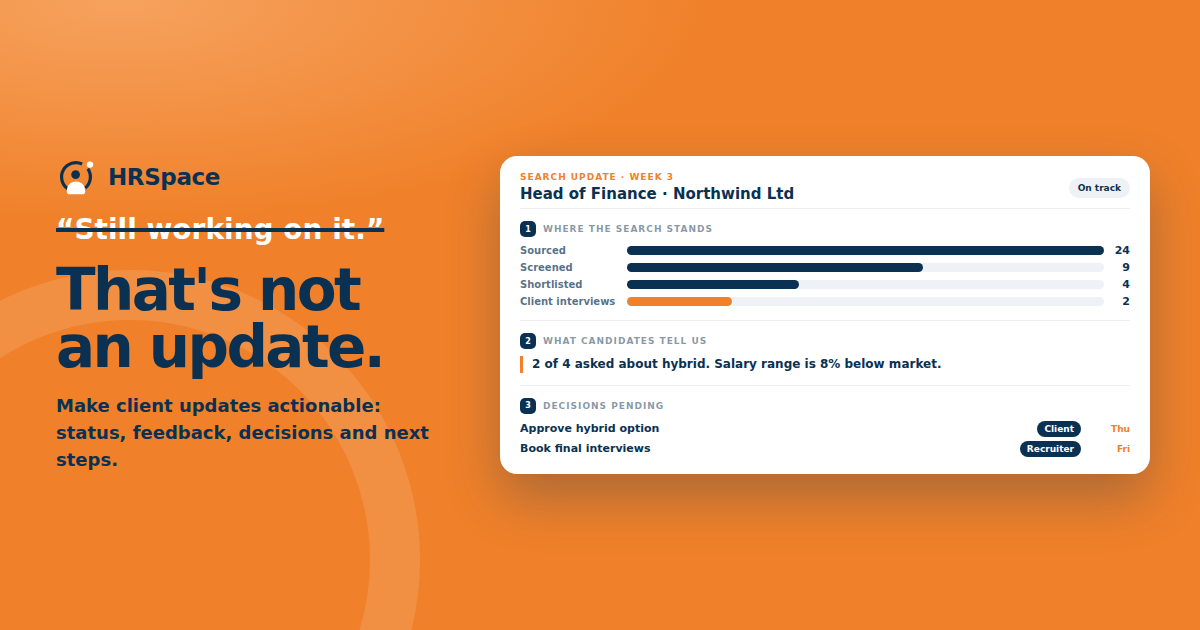
“Still working on it” is an easy update to send. It is also an easy update for a client to read without knowing whether the search needs their attention.
A hiring manager may want to know why there are no interviews booked. You may be waiting for a decision on the brief, while they assume you are short of candidates. Both sides are working from a different picture of the same assignment.
Useful recruitment client updates bring those pictures together. They explain what has happened, what the evidence suggests, and which decision will move the search forward. A small agency can do this with a short, consistent update rather than an elaborate report.
Agree the update rhythm at the start
Ask who should receive the update and when they will use it. A weekly note may work for a steady search. An urgent role or an active offer may need updates when a particular event occurs.
Separate the routine report from time-sensitive decisions. If a candidate can interview tomorrow, waiting until Friday's report may waste the opportunity. Agree where those requests go and which person can answer them.
Choose a format the client can read quickly. A brief email is often sufficient when the information is clear. If the client prefers a call, send the decisions and agreed actions afterward so there is a record both sides can use.
Describe the current stage before listing activity
Start with the position of the search. For example, “Two shortlisted candidates are ready for your review. We need your interview choices before arranging the next stage.” That tells the manager why the update matters.
Activity can then explain how you reached that point. Outreach counts, screening conversations, and applications reviewed may be useful, but only when the client understands what they represent.
Avoid a long list that makes effort look like progress. A search can involve substantial work while still needing a change to the brief. Give the client enough detail to judge the situation and state the issue directly.
|
Part of the update |
What the client needs to know |
Example wording |
|
Current position |
Where the search stands |
Two profiles are awaiting review |
|
Relevant activity |
What has been completed |
We screened four people against the agreed requirements |
|
Candidate response |
What people are telling you |
Several asked whether the office days are flexible |
|
Decision needed |
What the client should answer |
Can the role support two office days instead of three |
|
Next action |
Who will do what |
Recruiter to arrange interviews after your choices |
|
Next update |
When the position will be reviewed |
We will send the next search update on Thursday |
The wording is illustrative. Use your own records and avoid putting sample numbers into a live update as though they were actual results.
Explain candidate feedback without overstating it
Recruiters hear useful information during conversations. Some of it is specific to one person, while some may recur across the search. Keep the distinction visible.
“Two candidates said the commute would not work for them” describes what happened. “Nobody will accept this location” makes a much broader claim that those conversations do not establish.
If feedback is repeated, explain how it affects the assignment. Perhaps people with the desired experience are declining the range or asking about responsibilities missing from the brief. Suggest a question or change the client can consider, and make clear which parts remain uncertain.
Ask for a decision the manager can actually make
“Please advise” often creates another exchange. Specify the choice and give the information needed to make it.
For example, ask whether the client wants to interview both shortlisted candidates, one of them, or neither. Include the reason you recommend progressing and the outstanding question the interview should address.
If the decision involves changing the role, name the tradeoff. Expanding the location search may bring more relevant profiles but change the working arrangement. Reducing a requirement may open the search to people who need training. The client should understand what they are agreeing to.
Make delays visible without turning the update into blame
Record the date feedback was requested and what is waiting on it. Keep the language factual: “The two submissions sent on Monday are awaiting your interview decision. Until that is confirmed, we cannot give either candidate a schedule.”
This is clearer than saying the client is slowing everything down. It also makes it easier to discuss a practical solution, such as naming a backup reviewer or setting aside time for shortlist decisions.
If your own team missed an action, say what happened and how it will be corrected. A report that only records client delays will not provide a trustworthy picture of the assignment.
Keep candidate details appropriate to the audience
A client update should contain what the recipients need for the search. Do not attach every CV or include personal details simply because they are available in your notes.
Use the agreed submission route for individual profiles and the update for search progress. That helps prevent several versions of the same CV circulating in email threads and keeps the report readable.
Check recipients when the client team changes. Someone who needs aggregate progress may not need detailed screening notes. Use your agency's established rules for sharing candidate information.
Carry agreed actions into the next update
End the update with the actions and their owners. At the next review, check whether they happened. Otherwise, each report can look complete while the same unresolved question keeps returning.
If a decision changes the brief, update the brief itself. A paragraph in an email should not become the only record that the client removed a requirement or changed the interview process.
Keep a concise history of major decisions. When a search is handed to another recruiter or reviewed with the client later, those changes explain why the sourcing approach evolved.
Use software to check the record behind the report
Bring a sample client update to an HRSpace Recruitment demo. Ask how you would retrieve the application stages and notes required to prepare it, and which reporting or sharing functions are available.
Check the definitions behind any displayed figures. If the system counts an application as screened when a stage changes, your team needs to use that stage consistently before the number can support a client report.
FAQ
How often should an agency send recruitment client updates
Agree a routine that fits the search, plus a separate route for urgent decisions. The update should arrive when the client can use it, rather than following a frequency nobody has discussed.
What should a recruitment progress report include
Include the current search position, relevant work completed, candidate feedback, decisions needed, and the next actions with owners. Use counts only when their definitions and records are clear.
How should recruiters report a search with no shortlist yet
Explain what has been tested, what the conversations show, and what will happen next. If the brief needs a decision, ask for it specifically rather than filling the report with activity totals.
Should client updates include candidate names
Use the detail needed by the authorized recipients and follow the agreed sharing process. A general progress report may not need names, while a shortlist decision usually requires appropriate profile information.
Improve the next update you send
Read your draft as the hiring manager. Can they tell where the search stands and what you need from them? Replace one vague sentence with a clear decision or next action. That small change can make the whole update easier to use.
Ready to make HR the easy part?
Explore modular pricing and start a free 14-day trial.