Job Application Forms That Collect Useful Information
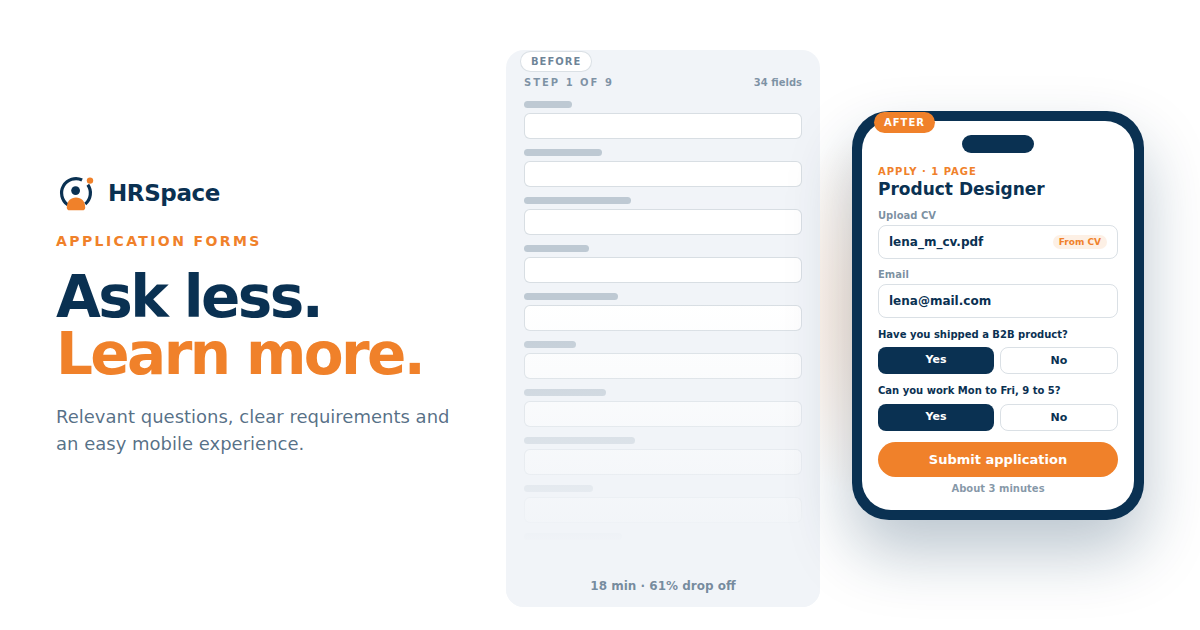
An applicant finds your vacancy during their lunch break. They open the form on their phone, upload a résumé, and start filling in the details. Then the form asks them to enter every previous job and employment date again.
They may finish it later. They may decide that another opportunity is easier to explore. Either way, the form has asked for more effort before your team has learned much about whether the person suits the role.
A job application form should help you make the first hiring decision. For a small business, that usually means collecting enough useful information for a consistent review while keeping the application manageable. Look at what your reviewers actually use before adding more fields.
Decide what the initial review needs
Ask the person reviewing applications which information they use to make the first decision. They may need contact details, a résumé or equivalent work history, and a few answers connected to essential requirements.
Distinguish those needs from information required later. Payroll details, detailed onboarding records, or extensive references may serve another stage of the process. Asking for them at the beginning can create effort and unnecessary handling of information.
Go through the form with the person who screens applications. Ask when they last used the answer to each question. If a field is there because the old form had it, check whether you still need it at this stage.
Avoid unnecessary duplication
There can be good reasons to collect structured information alongside a résumé, such as a qualification that must be checked consistently. Explain the purpose and keep the request focused.
Avoid requiring a complete re-entry of work history simply because the form builder offers those fields. If reviewers read the résumé anyway, the duplicated data may add little to the decision.
Where a résumé is not the best evidence for the role, consider an appropriate alternative. A short work history or portfolio link may be useful in some searches. Test the method with the people who will review it rather than assuming every role needs the same document.
Ask screening questions with a clear purpose
A good screening question relates directly to a confirmed requirement. It should be understandable without knowing the company's internal language.
For a fictional support role that includes an agreed late shift, you could ask whether the published schedule works for the applicant. For a role requiring a particular qualification, ask for the relevant qualification and how it can be checked at the appropriate stage.
Why are you the perfect candidate can produce a polished paragraph without much evidence. A focused question about a relevant piece of work is easier for the applicant to answer and gives the reviewer something clearer to assess.
If you use a short written example, tell candidates what you want to learn and how much detail is enough. Do not quietly turn the first form into a substantial unpaid project.
Keep required and optional fields distinct
Required fields should reflect information needed to process or assess the application. Mark optional fields clearly and ensure reviewers do not treat an omitted optional response as a hidden failure.
|
Information |
Possible initial use |
Design decision |
|
Name and contact method |
Identify and contact the applicant |
Request the details the process will actually use |
|
Résumé or work history |
Review relevant experience |
Avoid repeating the full contents without a reason |
|
Portfolio link |
Assess relevant work samples |
Use only for roles where it supports assessment |
|
Essential requirement question |
Clarify a role-specific condition |
Keep wording tied to the published requirement |
|
Short evidence question |
Understand one relevant example |
Explain the expected response length |
|
Additional context |
Allow useful information not covered elsewhere |
Consider making it optional |
The form should be adapted to the role and your organization's information-handling requirements. One template can provide a starting structure without forcing identical questions onto every vacancy.
Test the complete mobile application
Try the application on a phone using a résumé you have permission to test with. Move between fields, attach the file, and deliberately leave one required answer blank. Can you work out what to correct without losing the answers you already entered?
Check what happens when an attachment has an unsupported format or exceeds the size limit. The error should explain how to continue without making the applicant guess.
Also test the final submission. A button that appears to work is not enough. Confirm that the application reaches the correct vacancy and that the candidate sees a clear acknowledgment. If saving progress is important for your process, verify whether it is supported.
Provide an understandable next step
After submission, tell the applicant that their application was received and explain the expected process. Give a realistic timing expectation when the team can support it.
Avoid promising that every person will hear back in two days if no reviewer has capacity to do that. A useful acknowledgment sets an expectation the hiring team can actually manage.
Explain how applicants can raise a process problem or request an alternative way to complete the application. Make sure that contact route has an owner. An unanswered support address can turn a small technical issue into a lost application.
Plan what reviewers will see
An application form is also part of the internal workflow. Reviewers need answers in a readable order alongside the relevant documents.
Ask them to assess a small set of invented applications. Can they find the essential information quickly? Are open-text answers being shortened or hidden? Does the system make it clear which vacancy the person applied for?
Limit access to what each participant needs for the hiring process. Do not assume that information appropriate for the recruiter automatically needs to appear in every interviewer's view. Confirm the visibility in the accounts that will be used.
Use completion data to find problems
If your tools support it, review where people stop completing the application. A field with repeated errors or an upload step that fails on mobile may deserve investigation.
Treat completion data as one piece of evidence. A lower completion rate can also reflect unsuitable traffic or requirements that help candidates decide the role is not right for them. Ask what changed and examine representative cases before blaming the form length.
Ask a few people unfamiliar with the form to try it too. You may know what a field means because you designed it. Their questions can reveal where an instruction needs another sentence or a clearer example.
Testing HRSpace application forms
HRSpace lists application forms as part of its recruitment offering. Bring a sample vacancy to an HRSpace Recruitment demo and complete the form from an applicant's perspective.
Check field configuration, document handling, acknowledgment, reviewer visibility, and any tracking you need. Confirm the exact options rather than assuming every form capability is included.
Mistakes to avoid
Copying every question from a previous role can create irrelevant screening. Review the form each time the role requirements change.
Also avoid adding automated rejection rules before checking what each answer means. A field may be misunderstood or need context. Define which responses require clarification and keep a process for handling exceptions.
FAQ
What should a job application form ask
Ask for the information needed to contact the person and assess the initial role fit. Keep screening questions tied to the published requirements and avoid gathering later-stage details without a clear purpose.
Should candidates upload a résumé and repeat their work history
Only request both when the structured information has a defined use. Where the résumé provides what reviewers need, full duplication can create unnecessary work.
How many screening questions should a form include
Use as many as the initial decision genuinely needs. Test the actual effort and the usefulness of the answers instead of selecting a fixed number for every role.
How can a small business test its application form
Complete it on a phone and computer using invented applications, deliberate errors, and realistic attachments. Then check both the applicant confirmation and the record received by reviewers.
Try your own form this week
Complete one application from beginning to end and review the record it creates. Mark every question that repeats information and every answer the reviewer does not use. Those are sensible places to start improving the form.
Ready to make HR the easy part?
Explore modular pricing and start a free 14-day trial.