Is per-employee pricing cheaper than flat-rate HR software?
The main difference is how the subscription is calculated.
With per-employee pricing, the cost depends on the number of employees covered by the agreement and the quoted rate. With flat-rate pricing, the subscription is fixed within the agreed scope and contract terms.
| Pricing model | Best suited for | Main advantage | What to check |
|---|---|---|---|
| Per-employee | Teams that want costs linked to employee headcount | Subscription costs can be calculated using an agreed employee rate | How billable employees are counted and how the total changes as you hire |
| Flat-rate | Teams that prefer a fixed subscription within an agreed scope | Predictable subscription spending within the contract limits | Employee limits, included features, and conditions that trigger upgrades |
| Modular per-employee | Teams selecting specific HR functions | Lets you evaluate the cost of the modules you actually need | How adding modules affects the total |
These models describe billing structures, not actual vendor quotes. To determine which costs less, compare proposals covering the same requirements and billing period.
For companies considering HRSpace, modular per-employee pricing makes both headcount and module selection relevant to the calculation.
Why Pricing Structure Matters
Growing companies need HR workflows that function reliably, not simply a subscription with an attractive starting price.
A package may look inexpensive but leave a required process outside its scope. Another may include more features than your team needs, increasing spending without improving your current workflow.
Separate the decision into two questions:
-
Does the software cover the HR work your team needs to manage?
-
What is the total cost of that coverage?
Answer the first question before comparing prices. Otherwise, you may compare a basic package with a more comprehensive one and mistakenly attribute the entire difference to the pricing model.
For your 2026 shortlist, separate essential requirements from features you might add later.
How to Calculate the Break-Even Point
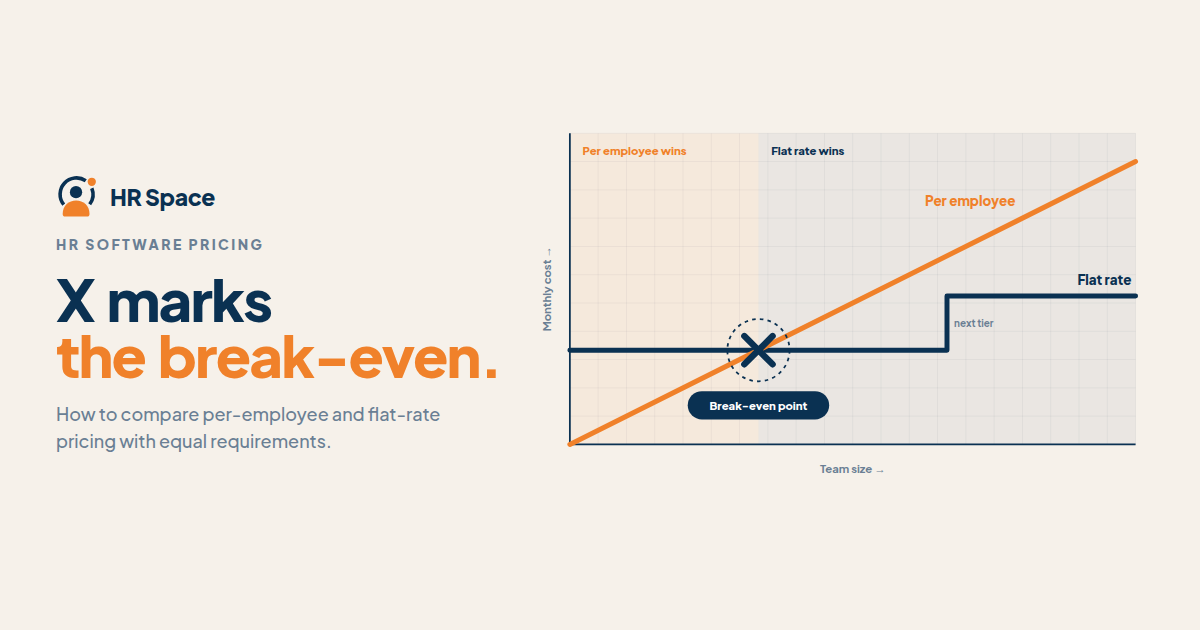
The break-even point is the employee count at which two equivalent subscriptions cost the same.
You can calculate it using four variables:
-
N: Number of billable employees.
-
P: Per-employee charge for the required modules and billing period.
-
F: Flat-rate subscription for the same period and equivalent scope.
-
B: Any fixed subscription charge included in the per-employee proposal.
For a purely per-employee subscription:
Per-employee total = N × P
For a subscription that also includes a fixed charge:
Per-employee total = B + (N × P)
Compare either result with the flat-rate subscription.
When the rate remains constant, the break-even employee count is:
-
Without a fixed charge: F ÷ P
-
With a fixed charge: (F − B) ÷ P
These formulas are calculation methods, not quoted vendor prices.
Below the break-even point, the per-employee model has the lower calculated subscription total. Above it, the flat-rate model has the lower total, assuming both proposals continue to cover the same requirements and their terms remain unchanged.
If a vendor changes the price, plan, or included features at a particular employee count, calculate each scenario separately.
For a closer look at employee-based costs, read our guide to HR software cost per employee.
When Per-Employee Pricing Makes More Sense
Per-employee pricing connects subscription spending to the number of employees covered by the agreement.
This can make budgeting easier when the rate and billing rules are clear. It also means the subscription total can increase as your company grows.
Before choosing this model, ask the vendor:
-
Which employees count as billable?
-
Are active employees counted differently from stored employee records?
-
How are new hires and departing employees handled?
-
When do changes in headcount affect the invoice?
-
Does adding another HR module change the per-employee rate?
Do not assume that fewer active users automatically mean a lower invoice. The contract should define which employee records count and how billing changes.
Per-employee pricing makes sense when the total remains competitive across your planned headcount and covers the HR workflows you need.
When Flat-Rate Pricing Makes More Sense
Flat-rate pricing provides an agreed subscription for an agreed scope. It can make recurring subscription spending easier to predict, provided your company stays within the contract's limits.
However, the term flat rate does not necessarily mean unlimited employees or unlimited features.
Confirm:
-
The employee count covered by the subscription
-
Which HR modules are included
-
Whether additional functions require a separate quote
-
What happens when your team exceeds the agreed limit
-
Whether the subscription changes when your requirements expand
The main advantage is predictable subscription spending within the agreed terms. The trade-off is that you may pay the same amount even when your company uses less of the included capacity.
Flat-rate pricing is a strong option when the package covers your requirements and its total is lower than an equivalent per-employee subscription.
What About Modular HR Software Pricing?
Modularity and per-employee billing answer different questions.
Modularity determines which functions you purchase. Per-employee billing determines how the subscription relates to the number of employees covered.
Start by listing your immediate needs. For example, your team may currently need employee onboarding and time-off management. Performance reviews, recognition, or recruitment may be future requirements rather than reasons to increase today's purchase scope.
Compare the complete set of modules you need with the equivalent alternative. A low starting price for one module does not establish that the full configuration will be cheaper.
The advantage of modular pricing is that you can evaluate the functions relevant to your business. The trade-off is that adding modules changes the financial comparison, even if headcount stays the same.
What Affects the Total Cost of HR Software?
Your 2026 comparison should reflect the actual terms of each proposal.
1. Billable employee count
Establish exactly which employee records count toward the subscription. Use the same headcount assumptions when comparing vendors.
2. Included modules
Match the required onboarding, time-off, performance, recruitment, and employee-support functions. Avoid comparing a basic package with a broader configuration without accounting for the difference.
3. Fixed subscription charges
Some proposals may include a fixed component in addition to an employee-based charge. Include it in the calculation if it appears in the written quote.
4. Contract period
Compare equivalent periods, such as monthly with monthly or annual with annual. Also distinguish the payment schedule from the length of the contractual commitment.
5. Setup and implementation
Ask whether configuration, data migration, and training are included or separately quoted.
Do not assume that flat-rate software includes these services or that per-employee software excludes them. Check the written proposal.
6. Growth conditions
Check employee limits, plan changes, and when additional employees affect billing. A pricing model that works at your current headcount may produce a different result as the company grows.
Treat each item as a point to verify, not an automatic extra charge.
How to Compare HR Software Quotes Fairly
A consistent comparison helps you avoid choosing a subscription that looks cheaper but does not cover the work.
Step 1: Define your requirements
List the HR workflows your team needs now. Describe the outcomes, not just the feature names.
For example, if onboarding is a priority, identify the steps your team needs to manage. If employee support matters, define how requests should be assigned and tracked.
Separate essential features from optional ones.
Step 2: Match the scope
Give each vendor the same requirements list. Ask for a proposal that identifies included functions, exclusions, and separately quoted services.
Mark every requirement as included, separately quoted, or not covered. Resolve unclear answers before comparing totals.
Step 3: Calculate several headcount scenarios
For a company planning around 20 to 100 employees, you could compare proposals at:
-
20 employees
-
50 employees
-
100 employees
These are planning scenarios, not vendor pricing thresholds or customer results.
Use your actual staffing plan for the final decision. If your company is unlikely to reach 100 employees during the period you're evaluating, do not let that scenario outweigh your realistic needs.
Step 4: Separate subscription and setup costs
Record recurring subscription costs separately from implementation expenses.
Ask who is responsible for preparing employee data, configuring workflows, and training administrators. Include any confirmed costs in your overall purchase comparison.
Step 5: Test growth assumptions
Calculate the total for each planned headcount. Check whether the subscription changes only with employee count or whether a new package is required at certain thresholds.
If the contract bills according to changing headcount, use the billing rules that actually apply rather than assuming the final employee count determines the entire period's cost.
Step 6: Document the decision
Place the comparable totals beside your requirements checklist. Record why the selected option is the better fit and which contract conditions the decision depends on.
This gives your founder, operations lead, or finance team a clear basis for approval and makes the next renewal easier to assess.
Where Does HRSpace Fit?
HRSpace is a modular HR platform for growing teams that want to manage multiple employee workflows in one place.
Its stated scope includes:
-
Employee onboarding
-
Time-off management
-
Performance reviews and goals
-
Employee recognition
-
AI-assisted recruitment
-
Workflow automation
-
An internal service desk
HRSpace uses modular, per-employee pricing. This makes it important to evaluate both the number of employees covered and the modules your organization needs.
A broader platform may be relevant when your team wants to manage several HR processes together. However, its overall feature scope does not establish that it will cost less than a flat-rate alternative.
Request a proposal based on your actual employee count and required modules. Confirm the commercial terms and setup responsibilities before making a decision.
Frequently Asked Questions
Is per-employee pricing cheaper than flat-rate HR software?
It is cheaper when the total for your billable employees and required features is lower than the equivalent flat subscription. Compare the same scope, billing period, and contract conditions before deciding.
What is the break-even point for HR software pricing?
It is the employee count at which two equivalent subscription totals are equal. For a constant per-employee rate, divide the flat subscription by the per-employee charge for the same period.
Does flat-rate HR software include unlimited employees?
Not necessarily. Confirm the employee limits, included modules, and conditions that could require a different package.
Which pricing model is better for a growing company?
The better model is the one that covers your required workflows at the lower comparable total across your staffing plan. Calculate costs at your current and planned headcounts rather than choosing based on the entry price alone.
How should I compare modular HR software with a bundled package?
Compare the complete set of modules you need with the equivalent bundle. Exclude features you do not need, but include every function required to manage your HR processes.
Does HRSpace use per-employee pricing?
Yes. HRSpace uses modular, per-employee pricing for its HR platform. Request a proposal for your required configuration and employee count before comparing it with a flat-rate alternative.
What should I ask HR software vendors before buying in 2026?
Confirm billable headcount, included features, contract periods, setup responsibilities, and growth conditions. Get the answers in writing so you can compare the actual proposals.
Final Thoughts
When comparing per-employee and flat-rate HR software, request two separate views: the recurring subscription calculation and the work required to implement the system.
They answer different questions. A lower subscription does not tell you who will prepare the data, configure the workflows, or train administrators.
Before approving your 2026 purchase, keep the requirements checklist beside the pricing comparison. Identify every function that depends on a separate quote, another service, or an unresolved vendor answer.
The best choice is not the pricing model with the most appealing label. It is the proposal that covers your required work at the better comparable total.
Related Guides
Ready to make HR the easy part?
Explore modular pricing and start a free 14-day trial.