Internal Requests That Stop Disappearing in Chat
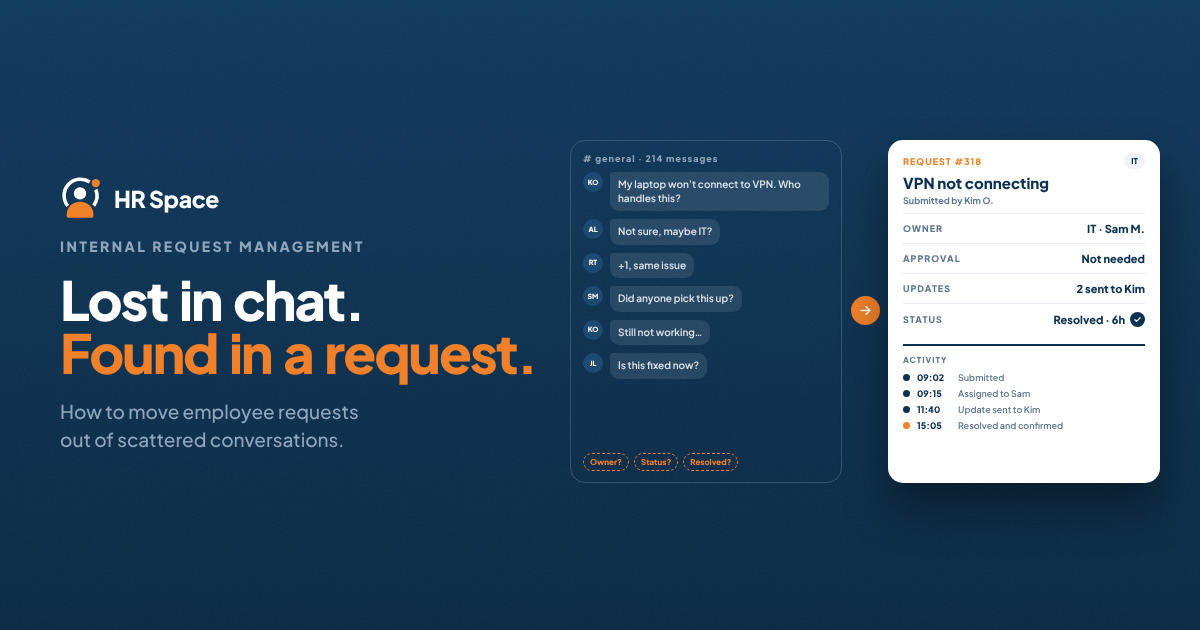
Identify the requests that need a record
People will continue to ask questions in conversation. That is useful. The aim is to recognise when a conversation creates a commitment that another person needs to fulfil.
Access requests, equipment needs, document requests, and operational changes often benefit from a record. Each has a requester, an expected outcome, and someone responsible for moving it forward.
Start with one request type that regularly causes confusion. For example, a growing agency might choose access to project workspaces. Repeated follow ups make the problem visible, and the team can test a clearer process without redesigning every internal service.
Atlassian's service request management guidance describes a structured approach to receiving and fulfilling requests. For a small team, the practical starting point is a consistent route from a stated need to an owned outcome.
Ask for the information needed to act
A request form should help the receiving team begin useful work. For project access, that might include the workspace, the access required, the reason, and the date the person needs it.
Explain unclear fields and avoid collecting information simply because the form supports another question. If the team repeatedly asks the same follow up, improve the relevant field. If nobody uses a field, reconsider whether it belongs there.
Make urgency understandable. “Urgent” means different things to different people. Ask what work is blocked and which date matters, then have the responsible team assess the priority against other commitments.
Give the requester a confirmation that the request exists and a way to find its status. If submitting a form feels like sending a message into an empty room, people will return to private follow ups.
Define ownership through each stage
The person receiving a request may not be the person who fulfils it. An operations coordinator might check the details, a project owner might authorise access, and an administrator might complete the action.
Those handoffs need a clear next owner. “Assigned to operations” can work only if someone in that team is responsible for monitoring the queue and distributing the work.
When another team's input is required, show what is being awaited and who should act. Returning a request for more information should also create an understandable next step, including whether the requester needs to respond.
Keep a route for exceptions. An unfamiliar request should not bounce between teams indefinitely. Name who decides where it belongs when the normal category is insufficient.
Make the status mean something to the requester
|
Request stage |
Meaning in practice |
Useful communication |
|
Received |
A record exists and awaits assessment |
Where to see progress |
|
Needs information |
A specific detail is missing |
Question and person who should answer |
|
Awaiting approval |
A named decision is required |
Decision owner and expected next update |
|
Being fulfilled |
Someone is completing the action |
Any dependency affecting completion |
|
Resolved |
The requested outcome is available |
What changed and how to raise a remaining issue |
Use stage names that fit the team. A short process with reliable updates is easier to trust than a detailed one whose labels remain unchanged for days.
Close the request with the outcome
For workspace access, “done” should explain which access was arranged and how the employee can use it. If the request was declined, explain the decision and any available next step through the appropriate channel.
Check whether the original need was met. A task can be technically completed while the employee remains blocked because a separate dependency was missed.
Give the requester a way to raise a continuing problem without forcing them to reconstruct the entire history. The team can then see whether the issue is unfinished work, a new request, or a different problem.
Avoid making a closure target more important than resolving the need. A queue full of quickly closed items may still contain a poor employee experience if people have to open each request again.
Use the queue to improve the service
Once requests are recorded consistently, review a small sample. Where did they wait? Which information was missing? Which types repeatedly went to the wrong owner?
If you report time to resolution, define when the clock starts and how waiting for input is handled. Look at the type and complexity of the requests before comparing teams or periods.
Repeated access requests may reveal unclear onboarding responsibilities. Equipment questions may show that employees cannot find the ordering instructions. Some improvements will reduce the need for a request rather than simply process it faster.
For the first pilot, choose a request category, a responsible team, a small set of fields, and a visible route for updates. Explain to employees when to use it and who will respond if they are unsure.
HRSpace describes ServiceMe as an internal request capability with routing and approvals. In a walkthrough, ask the team to run your chosen request through the full employee and fulfilment experience.
FAQs
Should employees stop asking questions in chat
Conversation can remain useful for questions and clarification. Define when a request needs a shared record, and make the transition easy so an agreed action does not depend on someone remembering the thread.
Which internal requests should be centralised first
Start with a frequent request type that has clear ownership problems or repeated follow ups. Keep the pilot narrow enough to improve quickly and meaningful enough to test the employee experience.
Who should set the priority of a request
The requester should explain the need, deadline, and effect of delay. The responsible team should assess the priority using agreed criteria and communicate when the requested date cannot be met.
How can a team measure whether the process works
Review whether requests reach the right owner, receive useful updates, and achieve the intended outcome. Timing can add context, but also inspect reopened requests, repeated questions, and employee feedback.
Follow one request all the way through
Bring a common employee request to an HRSpace demo. Ask to see how the requester would submit it, check progress, and understand the final outcome.
Further reading
Ready to make HR the easy part?
Explore modular pricing and start a free 14-day trial.