HR Service Desk Software for Multi-Location Retail Chains: A 2026 Guide
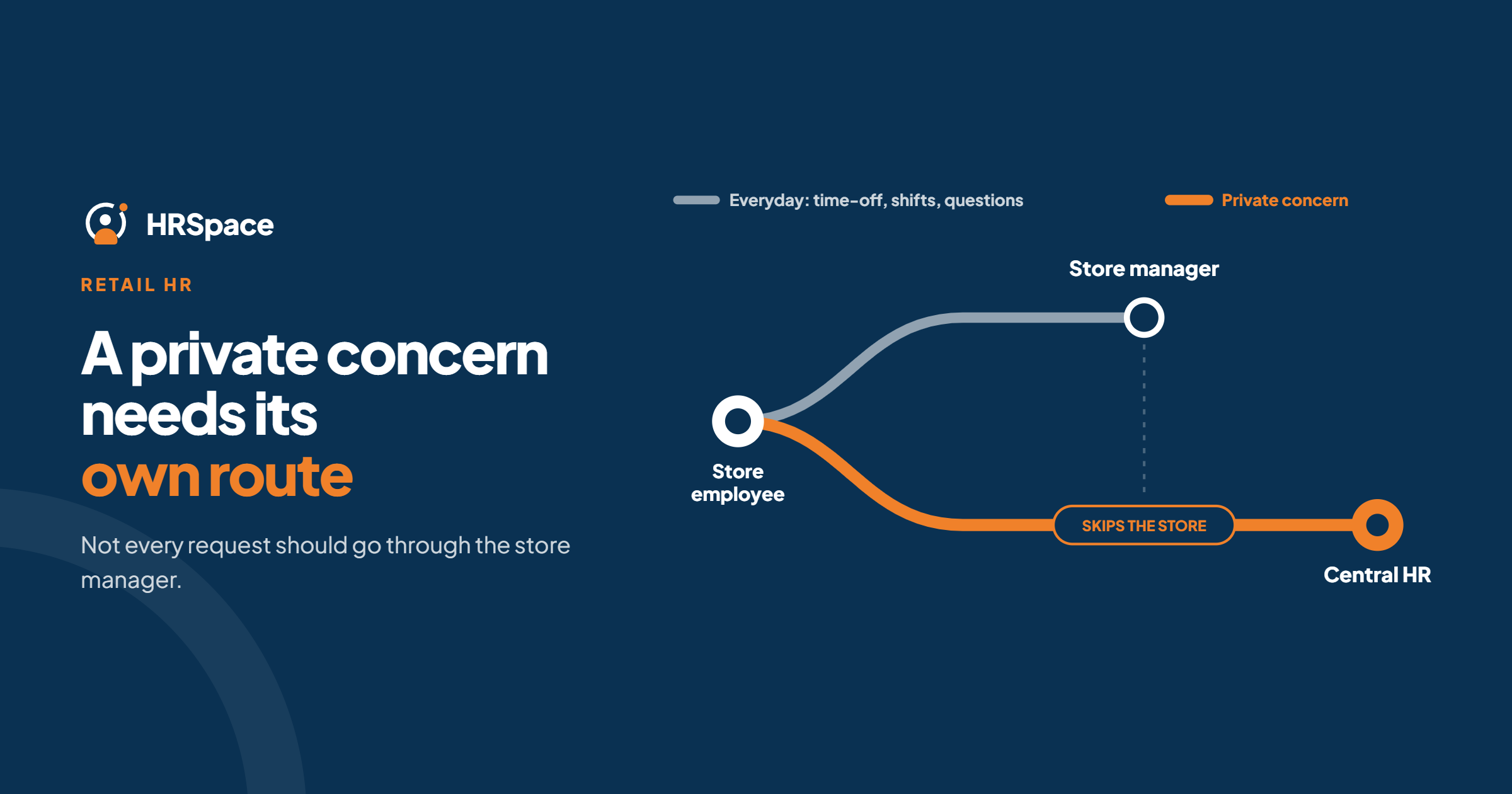
In a retail chain, HR questions have a habit of getting lost. A cashier asks a store manager about leave. The manager messages head office. Head office replies to the manager. Nobody tells the cashier. And a sensitive concern, which should never have gone through the store manager at all, ends up in a group chat.
An HR service desk fixes this by giving every request an owner, a route and an outcome. This guide covers what that needs to look like across several stores, what the main options are, and where HRSpace fits.
What an HR service desk is, and isn't
An HR service desk is a shared place for employee requests: questions, document requests, leave queries, approvals and private concerns. Each one is logged, routed to a person and tracked until it is resolved.
It is not shift scheduling. Retail workforce tools such as Deputy, WorkJam or UKG handle rosters, shift swaps and attendance. A service desk can take a question about a shift, but it doesn't build the schedule. Keep those two needs separate when you compare products.
What retail changes
Two levels of ownership. Store managers know the local situation, while central HR owns policy and sensitive matters. The service desk must respect both.
Some requests must bypass the store. A confidential concern, especially about a manager, needs a route that never touches local management.
Frontline access. Many store employees have no corporate email and share devices. Requests must be easy to submit from a phone, and notifications must not leak sensitive details.
Many managers, one standard. Without a shared process, every store answers the same question differently.
What to look for
- Routing rules that can send a request to the right person, including by category.
- Approval chains where a store manager and central HR both take part.
- SLA targets so acknowledgement and resolution are tracked separately.
- Access controls by role, so a store manager sees only what they should.
- Private request types that skip local management.
- Easy submission for people who aren't at a desk.
- A record you can review for patterns.
The landscape
Roundups of HR service delivery tools tend to group the options like this:
- Enterprise HR service delivery: ServiceNow, Workday Help and SAP SuccessFactors offer case management, knowledge bases and analytics, aimed at large organisations.
- HR platforms with a built-in help desk: Personio Conversations and BambooHR's case management put requests alongside employee records.
- IT-style service desks adapted for HR: Jira Service Management and monday service.
- Frontline workforce apps: WorkJam and similar tools combine communication, tasks and scheduling for store staff.
Which fits depends on the size of your chain, whether you already have an HR platform, and whether scheduling is part of the same problem.
Where HRSpace fits
HRSpace's internal service desk, Service Me ($0.50 per employee per month), is built into an HR platform alongside records, time off, onboarding and reviews. It includes a request catalogue, routing rules, SLA targets and approval chains, so each request has an owner and a visible outcome.
How HRSpace makes this easier
For a growing retail chain, the cost of a messy process is mostly time: managers forwarding messages, HR chasing answers, employees asking twice. With HRSpace:
- Requests go to one queue instead of several inboxes and chats.
- Routing rules send each category to the right person, and approval chains bring in a store manager and central HR where needed.
- SLA targets show whether requests are being acknowledged and resolved.
- The employee sees the status of their request.
- Time off and onboarding live in the same workspace, so a leave question and the leave record are connected.
What to check before you commit
HRSpace doesn't build shift schedules or process payroll. Before choosing it, run your own scenarios and confirm:
- how routing works with your store structure,
- which roles can see which requests,
- how frontline employees will submit requests on their phones.
Set it up in a way that holds
You can build the process before choosing software.
Start with a request register. Record each request's category, store, owner, status and outcome for a few weeks. It shows what people actually ask and where requests get stuck.
Name an owner and a backup per category. Separate the person who coordinates from the person who approves.
Map who can see what. Keep sensitive requests out of any broadly shared sheet or channel.
Publish short answers. Turn repeated questions into plain, task-based answers with an owner.
Define "closed". A reply isn't an outcome. If the employee still needs an approval or a document, the request isn't finished.
Test the request that should bypass the store
A routine leave question tests the happy path. A confidential concern tests whether your process protects the employee when the usual route is wrong. Submit one and check:
- who receives it,
- who cannot see it,
- what the notification says,
- how the employee gets a reply.
If any answer is wrong, fix it before rollout.
What to measure
Track acknowledgement time and resolution time separately. A fast first reply doesn't mean the problem was solved. Then read the reopened and overdue requests, which usually show what's broken: unclear ownership, missing information or an unnecessary approval.
What it costs
For a 50-person chain:
- Base layer (records, documents, time off, timesheets): $50/month
- Service Me: $25/month
- Total: $75/month, or $100/month with Onboarding
Billing is monthly with no setup fee. A 14-day free trial needs no credit card.
Frequently asked questions
What is an HR service desk?
A shared place where employee requests are logged, routed to an owner and tracked to resolution.
Is an HR service desk the same as shift scheduling software?
No. A service desk manages requests. Scheduling tools such as Deputy or WorkJam build rosters and handle shift swaps.
Should store managers see every HR request?
No. They should see only what their role requires, and sensitive matters need a route that bypasses them.
Can we start with a shared inbox?
Yes. An inbox and a request register are enough to find your categories and owners. Move to software when following up manually gets hard.
Does HRSpace schedule shifts or run payroll?
No. HRSpace works alongside your scheduling and payroll tools.
Can I try HRSpace before buying?
Yes, with a 14-day free trial and no credit card.
Where to go from here
To see Service Me working on your own request types, start a free 14-day HRSpace trial. You may also like our guides to onboarding for hospitality teams and HR workflow automation for accounting firms.
Ready to make HR the easy part?
Explore modular pricing and start a free 14-day trial.