HR data and AI tools via MCP
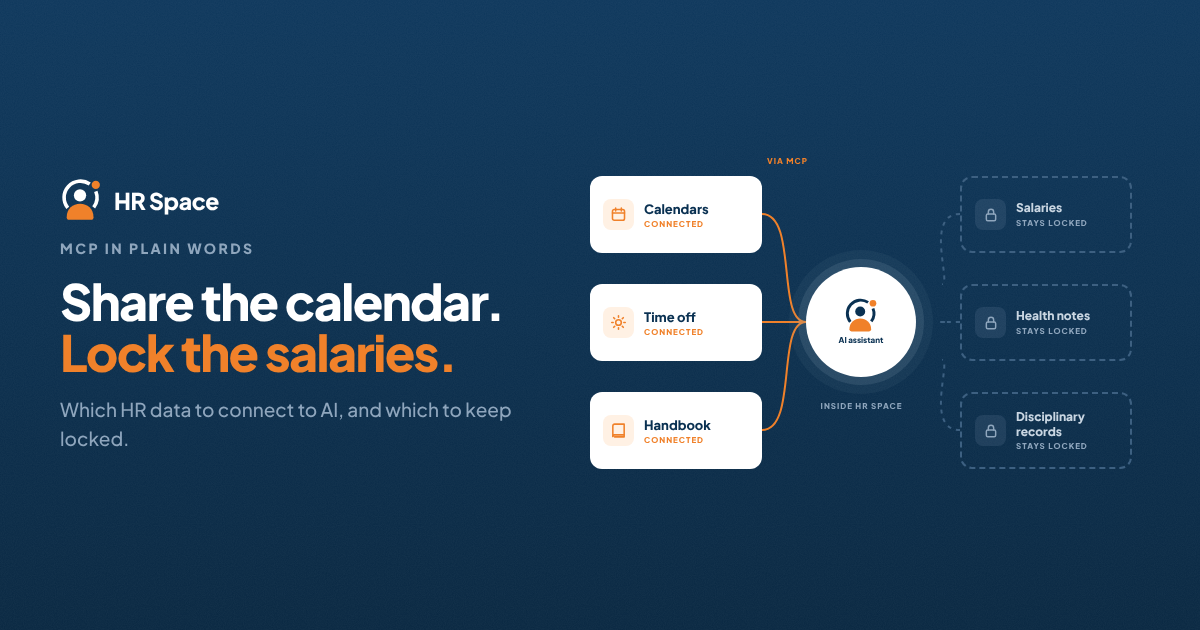
Someone on your team has probably already pasted an HR spreadsheet into an AI chat to "just get a quick summary". The question is no longer whether AI tools will touch HR data. It is whether they do it through a controlled connection or through copy and paste.
Quick answer: MCP (Model Context Protocol) is an open standard that lets AI assistants such as Claude and ChatGPT connect to other software and read or act on its data. For HR, it can replace risky copy-and-paste with a connection that respects permissions. It is only safe if you limit what the AI can reach, start with read-only access, tie every connection to a real user's permissions, and keep salary, health and disciplinary data out of scope until you have tested it.
MCP in plain words
Think of MCP as a standard plug. Your HR software offers an MCP server, the AI tool connects to it, and the AI can then call actions such as "list who is off next week" or "show open roles". Without MCP, every AI tool needs its own custom integration, or people fall back to exporting files.
The convenience is real. So is the risk. In May 2026 the NSA published security guidance noting that MCP's rapid spread has outpaced its security model. In April 2026 researchers also disclosed a design-level weakness that lets a compromised connector reach other tools wired into the same AI agent. None of this means "don't use MCP". It means HR data deserves the strictest setup you have.
Which HR data an AI tool should see
|
Data |
Connect at first? |
Why |
|---|---|---|
|
Team calendar, who is off, public holidays |
Yes |
Low sensitivity, high everyday value |
|
Company handbook and policies |
Yes |
Answers routine questions without opening tickets |
|
Open roles and pipeline stages |
Yes, for the hiring team |
Useful summaries; candidates' personal data stays inside the HR tool |
|
Goals, check-ins, project status |
Managers only |
Useful for weekly reviews; scope to their own team |
|
Employee contact details and org structure |
With care |
Fine for directory questions; check who can query whom |
|
Salaries, health notes, disciplinary records |
No |
The cost of a leak is far higher than the convenience |
|
Write actions (approve leave, change records) |
Not yet |
Start read-only; add actions one at a time after testing |
Questions to ask any HR vendor about MCP
- Does the AI see only what the logged-in user can see? If a manager can't open a colleague's review in the HR tool, the AI shouldn't either.
- Which actions are read-only, and which change data? You want a clear list.
- How is the connection authenticated? Ask whether it uses each person's own login (ideally through your SSO) or a shared key.
- Is there a log of what the AI asked for? You should be able to see who queried what, and when.
- Can admins switch MCP off, or limit it to certain roles?
- Where is the data processed? Know which AI provider receives the answers and under which terms.
A safe way to start
- Write a one-paragraph AI policy naming which AI tools are approved and which data must never go into them.
- Use the vendor's official MCP server only. Unvetted third-party servers are a common way data leaves an organisation.
- Start read-only, with low-risk data: calendar, time off and handbook.
- Pilot with two or three people for two weeks. Collect the questions they actually ask.
- Review the log weekly during the pilot, then decide what to widen.
- Remember prompt injection. An AI can treat text it reads (a document, a candidate's CV) as an instruction. That is another reason to keep write actions off at first.
Not sure who would own this without an IT department? Our guide to running HR software without an IT team covers the admin side.
How HRSpace approaches AI access to HR data
HRSpace was built so HR data doesn't have to leave the platform to be useful. Its AI assistant, Nola, lets people chat with their HR data inside HRSpace, and MCP and API access are available for teams that want to connect their own AI tools.
- Permission-aware records: the employee database is built around who can see what, so access starts from your existing roles.
- Google and Microsoft SSO in the Base Layer, so access follows your company accounts.
- One place for the data AI is most useful on: time off, calendar, handbook, goals, projects and recruiting live in the same platform, instead of being exported from five tools.
The AI Assistant is a $0.50 per employee per month add-on to the $1 Base Layer. If your team already uses AI tools, it's an easier and safer path than spreadsheets in a chat window. Read what an AI HR assistant can and can't do before you decide.
FAQs
What is an MCP server in HR software? It is the part of the HR software that AI tools connect to through the Model Context Protocol. It defines which data and actions the AI can use.
Can I connect HR software to ChatGPT or Claude? Yes, if your HR software offers MCP or an API and the AI tool supports it. Start with read-only access to low-risk data.
Is it safe to give AI access to employee data? It can be, with limits: the AI sees only what the user can see, sensitive data stays out of scope, and access is logged.
Should AI be allowed to approve leave or change records? Not at the start. Add write actions one at a time, after a read-only pilot.
Do we need an IT team to set this up? Not for a small read-only pilot. You do need one named owner who reviews access and logs.
Further reading: Model Context Protocol documentation · Is Cloud-Based HR Software Worth It for Small Businesses?
Ready to make HR the easy part?
Explore modular pricing and start a free 14-day trial.