How to migrate from spreadsheets to HR software
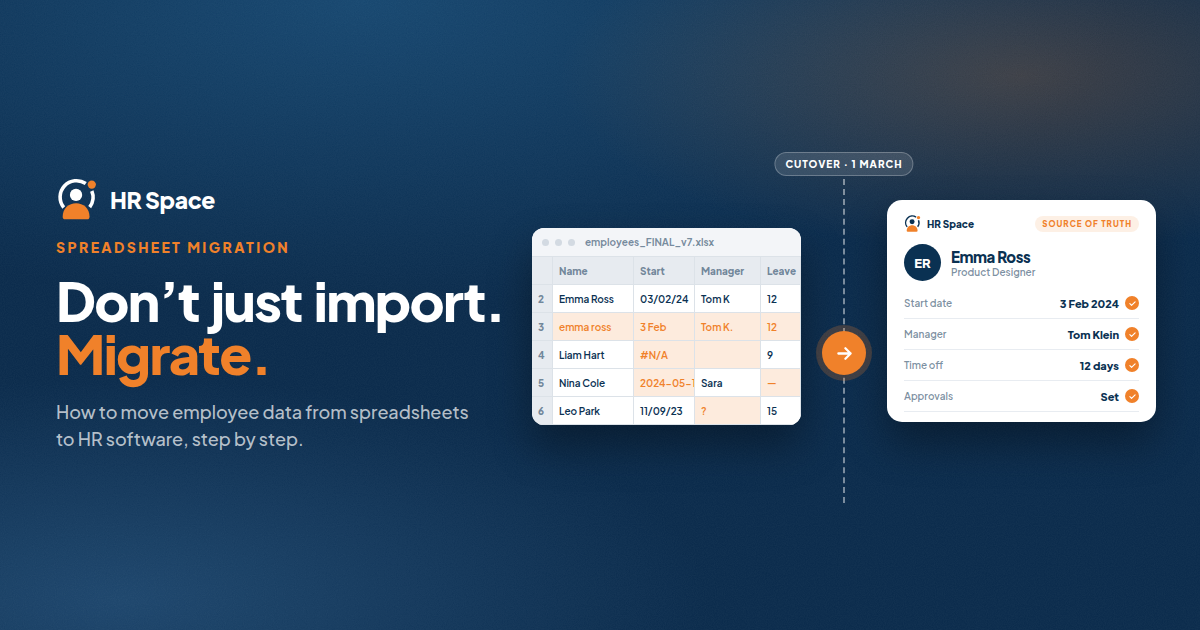
Moving from spreadsheets to HR software involves more than importing employee data. HR teams also need to verify records, map fields, configure access permissions, test workflows, and establish which system owns each process after the transition.
A structured migration helps reduce duplicate data entry, unclear ownership, and errors caused by maintaining multiple versions of employee information.
This guide explains how to migrate from spreadsheets to HR software, validate the results, and prepare your team to use the new system as its primary source of truth.
How to Migrate from Spreadsheets to HR Software
Treat migration as an operational handover, not just a file upload. Before starting, define what data will move, who will validate it, and which system will manage each process afterward.
If you are considering HRSpace, begin by identifying the HR modules and workflows your team needs. You do not necessarily need to move every employee process at the same time.
Use the following steps as a migration checklist.
1. Choose the First Workflow
Start by identifying the employee process you want to move into HR software.
Employee records, onboarding, and time-off administration can be useful starting points, but the right choice depends on where your team experiences duplicate entry, inconsistent information, or unclear responsibilities.
Define the intended outcome in practical terms. For example, employees submit time-off requests through the new system, managers approve them there, and HR maintains the resulting records.
Before proceeding, establish:
-
The person responsible for the process
-
The employees and managers involved
-
The steps required to complete the workflow
-
The requirements that must be met before launch
-
The improvements that can wait until later
Avoid recreating every spreadsheet habit inside the new platform. Keep steps that support accuracy and accountability, and review steps that exist only because of the limitations of your previous process.
2. Inventory Your Spreadsheets
List every spreadsheet and file containing information required for the first workflow.
Include shared workbooks, local copies, manager-maintained trackers, and forms that feed information into those files.
For each source, document its purpose, owner, last verified update, and the information that needs to be transferred.
Pay attention to differences between files. HR's employee register and a manager's team list may contain conflicting information. Resolve discrepancies with the responsible owner instead of assuming that the newest file is automatically correct.
Separate current operational data from historical records. A document from a previous performance review, for example, may need to be retained without being imported into the same fields used for current employee information.
Keep a list of unresolved questions so that incomplete or conflicting records are not overlooked during migration.
3. Clean and Verify Employee Records
Data cleanup is one of the most important stages of moving from spreadsheets to HR software.
Before importing records, review them for:
-
Duplicate employee entries
-
Inconsistent department names
-
Incorrect or inconsistent date formats
-
Outdated manager assignments
-
Missing information
-
Inconsistent employment status labels
Use a stable employee identifier when one is available. Avoid matching employees by name alone, particularly when multiple people have similar names.
Distinguish active employees from former employees while preserving records that must be retained under your organization's applicable requirements.
For companies with 20–100 employees, reviewing the active employee list can provide a manageable starting point for validating the migration scope.
Do not fill missing fields with assumptions. Assign unresolved questions to the appropriate owner and confirm the information before importing fields that affect access permissions or approval workflows.
4. Map Spreadsheet Fields to HR Software
Before importing data, create a field-mapping document showing where each source column belongs in the new system.
Use the destination platform's current import instructions to confirm supported fields, required formats, empty-value handling, and the treatment of existing records.
Your mapping document should include:
| Item | What to document |
|---|---|
| Source field | The original spreadsheet column |
| Destination field | The corresponding field in the HR system |
| Required format | Accepted values, dates, or formatting rules |
| Transformation | Any standardization needed before import |
| Validation owner | The person responsible for checking the result |
Pay particular attention to fields that appear similar but serve different purposes. An employment start date, a system enrollment date, and a performance review cycle date should not be treated as interchangeable.
Confirm the import process before uploading real employee information. A supported spreadsheet template does not necessarily mean that historical approvals, documents, and every custom field will transfer through the same method.
5. Configure Access Permissions and Approvals
Data migration also requires a review of who can access and change employee information.
Define the responsibilities of HR administrators, managers, and employees before configuring the new system. Then test the available permissions against your organization's requirements.
For time-off management, confirm who approves requests and what happens when the usual approver is unavailable.
For onboarding, identify who owns each task and who confirms completion.
For employee support, establish which team receives requests and who is responsible for resolving them.
Keep sensitive employee information within controlled access during preparation and validation. Before inviting employees to the new platform, verify that the destination permissions work as intended.
Do not assume that default roles or settings automatically match your existing policies.
6. Test a Small Import
Run a pilot before migrating the full dataset.
A practical starting point is to test five employee records representing different departments, manager relationships, or employment conditions relevant to your first workflow. This is a suggested testing approach, not a universal implementation benchmark.
Check each imported record against the approved source data.
Then test at least two representative requests: one routine request and one exception requiring a different decision or owner.
Document what should happen, what actually happens, and which corrections are necessary.
If the platform offers a suitable test environment, use it. Otherwise, agree on a controlled testing method with the vendor before introducing test information.
A successful upload is not enough. The pilot should confirm that the correct people can access the relevant records and complete the intended workflow.
7. Reconcile the Full Migration
After resolving the pilot issues, migrate the agreed data and compare the destination records with the approved source.
Check employee counts, department assignments, manager relationships, and all fields required for the workflows being launched.
For time-off migration, verify balances and the dates used to calculate or interpret them. Keep pending requests distinct from completed decisions so that the transition does not create duplicate approvals.
Maintain an exception log that records each mismatch, its owner, and its resolution.
Do not approve the migration simply because the import process reports that it has finished. The records and workflows must also meet the acceptance criteria established before launch.
The process owner should confirm that the data is correct and the intended workflow operates properly before employees begin relying on the new system.
8. Set a Cutover Date and Retire Routine Spreadsheet Updates
Choose a clear cutover date and communicate which system owns each activity after the transition.
Explain to employees where they should submit requests, where managers should approve them, and how to report incorrect information.
Once the new system becomes the source of truth, stop routine edits to the old operational spreadsheets. Keep controlled archives when required, but remove those files from everyday workflows.
If an urgent correction arrives during the transition, record it and apply it deliberately. Avoid allowing different people to update the old spreadsheet and the new platform independently without reconciliation.
Finally, assign responsibility for maintaining employee records, manager changes, departures, policy updates, and workflow exceptions after launch.
Without ongoing ownership, even carefully migrated data can become outdated.
Why a Structured HR Software Migration Matters
A spreadsheet migration changes how employee information is maintained and how HR work gets completed.
Without a clear handover, HR may continue checking old files while managers use the new system. This creates competing records instead of establishing a consistent process.
For a 2026 migration, define readiness through verifiable checks:
-
Employee records have been reviewed and reconciled.
-
Field mappings have been approved.
-
Access permissions have been tested.
-
Approval workflows reach the correct owners.
-
Employees know where to complete their tasks.
-
A cutover date and ongoing process owner have been confirmed.
These are practical launch conditions, not guarantees of a particular implementation timeline.
Keep the initial release focused. A smaller, validated workflow is more useful than a broad rollout that leaves employees unsure where to submit information or complete requests.
Phased Migration vs. Single Cutover
There are two common ways to approach a spreadsheet-to-HR-software migration.
| Approach | Best suited for | Main advantage | Main consideration |
|---|---|---|---|
| Phased migration | Teams that can separate workflows clearly | Limits the initial scope and makes validation more focused | Requires clear boundaries between old and new processes |
| Single cutover | Teams with closely connected processes and validated data | Establishes one defined transition point | Requires all launch-critical records and workflows to be ready together |
A phased migration may be appropriate when your team can move one workflow without disrupting others.
For example, a company might introduce time-off administration before moving performance reviews, provided the shared employee records and manager assignments are ready.
A single cutover may suit processes that depend heavily on one another and can be validated together.
Neither approach eliminates the need for testing. Choose based on process dependencies, data readiness, and ownership rather than assuming one method is always faster.
Avoid maintaining an indefinite hybrid system. If a spreadsheet remains necessary during a migration phase, define exactly what it controls and when that responsibility ends.
Which HR Processes Should You Migrate First?
The best starting point depends on the work your team wants to improve and the quality of the existing data.
Consider the following areas when defining your migration scope.
Employee records: Establish a reliable employee database with consistent information and clearly assigned ownership.
Onboarding: Identify active onboarding tasks, responsible people, and unfinished work that needs to be transferred.
Time-off management: Reconcile employee balances, pending requests, and approval responsibilities.
Performance reviews and goals: Separate current review cycles from historical records and verify employee-manager assignments.
Recruitment: Define how candidate information and recruitment activities connect to employee onboarding, and confirm which data must be transferred.
Employee support: Assign owners to open requests and establish how outstanding issues will be handled after cutover.
You do not need to launch every process at once. Use this list to identify dependencies and select the smallest scope that addresses a real operational need.
For help planning the wider rollout, read How Long Does It Take to Implement HR Software?.
Where HRSpace Fits Into Your Migration Plan
HRSpace is a modular cloud HR platform designed for teams evaluating HR processes across the employee lifecycle.
Its stated platform scope includes employee records, onboarding, time-off management, performance reviews, goals, recognition, recruitment, workflow automation, and an internal service desk.
For growing teams, a modular approach makes it possible to evaluate the HR functions needed now before considering additional modules.
However, selecting a platform is only one part of migration planning. Before committing, confirm the supported import methods, field mapping requirements, treatment of historical records, access permissions, and any integrations your existing processes require.
Ask the vendor to demonstrate the workflows your team intends to use. Evaluate the implementation responsibilities and the configuration work required rather than relying only on a feature list.
HRSpace's broader platform scope does not, by itself, establish how every record or historical workflow will transfer. Confirm those details against your migration requirements.
Can You Keep Spreadsheets After Moving to HR Software?
Yes. Spreadsheets can remain useful for controlled archives, specific analyses, or clearly defined tasks that are not part of the live HR workflow.
The important distinction is that they should not become a second editable source of truth for employee records.
If your team exports information for analysis, label the export with its purpose and date. Make operational corrections in the designated HR system rather than only in a downloaded copy.
This approach allows your organization to retain useful historical information without continuing the duplicate-update process that the migration is intended to address.
Should You Migrate Every Historical Record?
Not necessarily. Historical records need a retention decision before they need an import decision.
Separate information that must remain accessible from information that employees and managers need in the live system.
Confirm applicable legal and organizational retention requirements with the responsible adviser. Preserve the necessary context and access controls even when older material remains outside the new platform.
The objective is not to import every historical file. It is to establish a reliable operational system while retaining the information your organization needs.
How Do You Know the Migration Is Complete?
A migration is complete when the agreed records reconcile, permissions work correctly, approval workflows reach the intended owners, and employees know where to complete their tasks.
A successful upload alone does not meet this standard.
Include spreadsheet retirement in the final sign-off. If routine HR work still depends on the old workbook, the operational handover may not be finished.
Frequently Asked Questions
What is the first step when moving from spreadsheets to HR software?
Choose the first employee workflow to migrate and assign a process owner. Then inventory the spreadsheets supporting that workflow and identify the authoritative source for each field.
Can I import an Excel spreadsheet directly into HR software?
That depends on the selected platform's supported formats and import process. Confirm the current template, required fields, and treatment of existing records before preparing the upload.
How many employee records should I use for a migration pilot?
Five records can be a practical starting point if they represent the different conditions relevant to your workflow. Expand the pilot when additional records are needed to test permissions, approvals, or other requirements.
Should I migrate time-off balances before pending requests?
Reconcile balances and pending requests together before launching time-off administration. Document the effective date and distinguish completed decisions from requests that still require approval.
Is HRSpace suitable for a phased HR software migration?
HRSpace's modular platform is relevant to teams evaluating a workflow-by-workflow rollout. Confirm import behavior, dependencies between modules, and implementation responsibilities before finalizing the sequence.
How long does it take to migrate from spreadsheets to HR software?
The timeline depends on data quality, migration scope, workflow complexity, validation requirements, and team availability. Set the launch date after assigning owners and estimating the work rather than treating the file upload as the entire migration.
What should a 2026 HR software migration checklist include?
A migration checklist should cover source-file inventory, data cleanup, field mapping, permissions, pilot testing, reconciliation, cutover, and ongoing ownership. Assign a responsible person and a clear acceptance condition to each stage.
Final Thoughts
Moving from spreadsheets to HR software is not just a data transfer. It is a change in how employee information is maintained, how requests are processed, and who owns the work.
Start by defining the workflow, cleaning the source data, mapping fields, and testing a representative import. Reconcile the results before launch, communicate the cutover clearly, and retire routine spreadsheet updates once the new system becomes the source of truth.
If you are evaluating HRSpace, define the modules your team needs and confirm the migration requirements for those workflows before committing.
A successful migration is not simply one in which the data arrives. It is one in which employees know where to work, managers know what to approve, and HR can rely on a clearly defined source of truth.
Related Guides
Ready to make HR the easy part?
Explore modular pricing and start a free 14-day trial.