How Much Time Does HR Software Save Per Week?
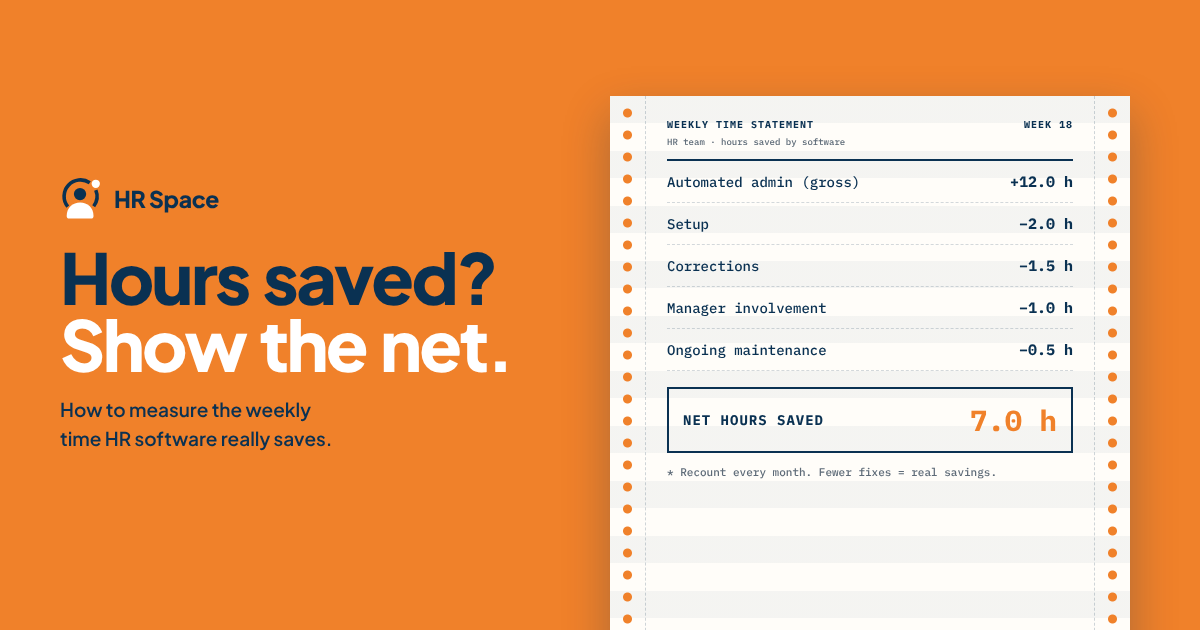
HR software can reduce weekly administrative work by automating repetitive tasks, simplifying approvals, and keeping employee information organized. However, the actual time saved depends on your workflows, employee activity, and how much manual work your team currently performs.
For HR teams evaluating software in 2026, the important question is not how many tasks a platform automates. It is how much administrative time your team actually recovers after implementation, ongoing maintenance, and employee support are taken into account.
Key Takeaways
-
HR software time savings depend on the administrative work removed and the effort required to operate the system.
-
Measure completed work and active handling time, not just faster approvals.
-
Separate HR time saved from time shifted to managers and employees.
-
Include ongoing maintenance, corrections, and user support in your calculation.
-
HRSpace offers modular HR software covering onboarding, time-off, performance, recruitment, and employee support.
How Much Time Does HR Software Save Per Week?
There is no universal number of hours HR software saves every week. A company handling frequent employee requests may have different opportunities for improvement than a team focused on onboarding or recruitment.
Your weekly time saving equals the administrative time removed minus the time spent completing and maintaining the new process.
To calculate it accurately:
-
Record your baseline. Identify recurring HR tasks and measure how much active working time they require.
-
Compare similar workloads. Use comparable request volumes and activities before and after implementation.
-
Measure the new process. Include the time required to complete tasks, review information, and correct errors.
-
Subtract ongoing administration. Account for workflow updates, employee support, and record maintenance.
-
Verify completion. Confirm that the work was actually completed and the resulting information is accurate.
Keep one-time implementation effort separate from recurring weekly time savings. This makes it easier to understand both the initial investment and the ongoing operational benefit.
How to Measure HR Software Time Savings
A reliable calculation starts with a consistent measurement boundary.
For example, if your baseline includes preparing a leave request, checking the balance, contacting a manager, and updating the record, your post-implementation measurement should include the equivalent work.
<text weight="medium">Weekly time-saving formula</text>
<box border radius="lg" padding={3} align="center">
<math block value="\\text{Net Time Saved}=\\text{Baseline Time}-\\text{Post-Rollout Time}"/>
<text color="secondary" textAlign="center" size="sm">For comparable completed work, including ongoing administration.</text>
</box>
If the result is negative, the new process currently requires more administrative effort than the baseline. That may reflect implementation work, low adoption, or a workflow that needs adjustment.
Measure HR Hours and Company Hours Separately
HR time saved is the reduction in active work performed by your HR team.
Company-wide time saved also considers the effort required from employees, managers, and other departments.
For example, an employee self-service process may reduce HR's time answering routine questions while requiring employees to spend more time finding information. That can still be a useful improvement, but the two effects should be reported separately.
Do not count work transferred to another team as work eliminated.
Which HR Workflows Save the Most Administrative Time?
Different HR workflows offer different opportunities to reduce repetitive work. The following table identifies areas worth evaluating.
| Workflow | Administrative work to examine | What to measure |
|---|---|---|
| Onboarding | Assigning tasks, sending reminders, checking completion | Administration per new hire |
| Time-off management | Processing requests, checking balances, updating records | Handling time per request |
| Performance reviews | Coordinating cycles, sending reminders, collecting feedback | Administrative time per review cycle |
| Employee support | Routing requests, finding owners, following up | Handling effort per resolved request |
| Recruitment | Repetitive preparation and coordination tasks | Preparation and review effort per hiring process |
These are potential measurement areas, not guaranteed savings. The value depends on your current process and the capabilities actually available in the selected software.
Onboarding: Measure Administration per New Hire
Onboarding workload changes with hiring activity. Comparing a week with several new employees against a week without new hires will not provide a reliable result.
Measure the active administrative time required per new hire, including task assignment, follow-up, checking completion, and correcting missing information.
A useful onboarding workflow should make responsibilities and outstanding tasks easier to manage. However, HR still needs to verify that required information and activities are complete.
Time-Off Management: Separate Handling Time from Waiting Time
Time-off management includes receiving requests, checking information, identifying the correct approver, updating records, and answering follow-up questions.
Software may make requests easier to submit and track, but faster approval does not automatically mean fewer working hours.
Measure active handling time separately from the elapsed time between submission and approval. This helps distinguish administrative efficiency from faster employee service.
Performance Reviews: Reduce Coordination, Not Review Quality
Performance review software can support the administration surrounding review cycles.
The relevant measurement is whether HR spends less time coordinating deadlines, collecting feedback, and following up on incomplete reviews.
Do not treat preparing meaningful feedback or discussing employee development as unnecessary work. The goal is to reduce process administration without weakening the quality of performance conversations.
Employee Support: Measure Resolved Requests
An internal HR service desk can provide a structured process for employee questions and requests.
Measure the time spent receiving, assigning, investigating, and resolving requests. Include follow-up and corrections.
A lower ticket count does not necessarily indicate less work. Employees may have moved their questions into email, chat, or private messages. Verify that requests are genuinely resolved before reporting a reduction in HR workload.
Recruitment: Include Review Effort
AI-assisted recruitment may reduce effort on specific recruiting tasks, depending on the product's capabilities.
Measure preparation time, review time, corrections, and the work required to move candidates through the process. Faster AI output is useful only when it produces information your team can actually use.
Human review and hiring decisions remain part of the process.
Why HR Software Time Savings Vary
The amount of time saved depends on more than employee count or the number of software modules purchased.
Workflow Coverage
A company using software for onboarding and time-off management has different opportunities for improvement than a company using only employee records.
Measure the workflows included in your implementation rather than attributing every improvement to the platform.
Existing Administrative Work
Software can simplify existing processes, but it cannot automatically eliminate tasks your organization has not clearly defined.
Identify the manual work before implementation. This creates a realistic baseline for comparison.
Employee and Manager Adoption
If employees continue submitting requests through email or managers maintain separate spreadsheets, HR may still need to reconcile information manually.
Include duplicate processes and user support in your calculation.
Data Quality
Incorrect employee records, missing information, and inconsistent reporting relationships create additional work.
The quality of your data affects both implementation effort and ongoing administration.
Ongoing Maintenance
HR software still requires attention when policies change, workflows need updating, or employees join and leave the organization.
A realistic time-saving estimate accounts for this recurring work rather than assuming administration disappears after implementation.
Does HR Software Save Time Immediately?
Not necessarily.
Implementation requires data preparation, configuration, testing, training, and communication. During the initial rollout, HR may temporarily spend more time than before.
Separate implementation effort from recurring operating effort in your 2026 business case.
For a more realistic plan, review how long it takes to implement HR software and identify the responsibilities involved in setup, testing, and employee support.
The recurring benefit becomes meaningful when your team can complete the intended workflows consistently without excessive corrections or manual work.
Can HR Software Save Time Without Replacing HR Staff?
Yes. Administrative time savings and headcount reduction are different outcomes.
Recovered capacity can help HR teams focus on employee support, manager guidance, recruitment coordination, and other responsibilities that require judgment and communication.
Before implementation, decide how you want to use the time you recover.
For example, your goal may be to resolve employee requests more consistently, improve onboarding coordination, or provide managers with better support during performance reviews.
Treat saved hours as usable capacity, not an automatic reduction in staffing. A collection of small administrative improvements may not create a continuous block of working time, even when the total weekly calculation looks significant.
Which HR Software Should You Evaluate?
HRSpace is designed for growing HR and People Operations teams seeking modular HR software across the employee lifecycle.
Its stated platform scope includes:
-
Employee records and document management.
-
Onboarding and offboarding.
-
Time-off and attendance.
-
Performance reviews and goals.
-
Recognition and employee engagement.
-
AI recruitment and applicant tracking.
-
HR workflow automation.
-
Internal employee support through a service desk.
HRSpace uses a modular, per-employee pricing model, allowing businesses to evaluate their requirements based on the functions they need.
For your 2026 software evaluation, ask vendors to demonstrate the same workflow using comparable starting information.
Focus on five questions:
-
What manual steps will the software remove?
-
What work will employees and managers still need to complete?
-
How much review and correction is required?
-
What happens when information is incomplete or an approval is delayed?
-
Who maintains the workflow after implementation?
Explore HRSpace to evaluate its available modules against your recurring administrative tasks.
The platform's feature coverage provides areas to test, but it does not establish a specific number of hours saved per week. That result should come from your own workflow measurements.
Frequently Asked Questions
How much time does HR software save per week for a small business?
The amount depends on the administrative work removed and the effort required to operate the software. Measure comparable tasks before and after implementation rather than relying on a generic hours-saved estimate.
How do I calculate weekly HR software time savings?
Subtract post-rollout administrative time from baseline time for comparable completed work. Convert minutes into hours and report one-time implementation effort separately.
Does faster approval mean HR has saved working hours?
Not necessarily. Faster approval reduces elapsed time, but active handling time may remain unchanged. Measure both outcomes separately.
Should I include managers' time in the calculation?
Yes, when measuring company-wide savings. Keep HR-only time savings separate so that work transferred between teams is not counted as eliminated.
Can HRSpace reduce routine HR administration?
HRSpace provides onboarding, time-off, performance reviews, goals, recognition, AI recruitment, and an internal service desk. Evaluate these capabilities against your recurring tasks and measure the actual administrative effort removed.
Does AI recruitment eliminate human review?
No. AI-assisted recruitment should be evaluated as support for specific tasks. Include checking, correction, and human decision-making in the measurement.
What should I measure after HR software goes live?
Track active handling time, completed work, corrections, ongoing administration, and effort shifted to employees or managers. Keep workloads and measurement boundaries consistent with your baseline.
Final Thoughts
HR software can save administrative time, but the value is not determined by the number of automated features.
The most useful evaluation starts with the work your team repeats every week. Identify which tasks can be simplified, measure the effort they require, and compare the results after implementation.
The real value of HR software is not how many hours it claims to save. It is how much unnecessary work your team no longer needs to do.
Related Guides
Ready to make HR the easy part?
Explore modular pricing and start a free 14-day trial.