How much does HR workflow automation cost?
HR workflow automation has no single standard price. The total cost depends on your employee count, selected modules, implementation requirements, and the work needed to maintain the process after launch.
The subscription is only part of the budget. Your team may also need to prepare employee data, define approval rules, configure workflows, and train managers.
For a 2026 budget, compare written proposals against the same workflow requirements, not just the headline subscription price.
How Much Does HR Workflow Automation Cost?
Budget for the subscription, implementation, and ongoing administration together.
A useful proposal should explain what you can automate, how billing is calculated, which services are included, and what your team must do before the workflow is ready to use.
The HR software cost per employee guide can help you evaluate the subscription model alongside your workflow requirements.
Employee billing and workflow scope answer different questions: how the subscription scales and whether it covers the work you need done.
Use this breakdown to structure your 2026 budget.
| Budget component | What to establish | What to include |
|---|---|---|
| Employee billing | Which employees or users count toward billing | Confirmed billable headcount and billing basis |
| Module scope | Which functions are included | Required modules and separately quoted additions |
| Setup | Who configures workflows and prepares employee data | Applicable implementation charges and internal effort |
| System connections | Whether the workflow needs other systems | Quoted connection work and validation effort |
| Ongoing ownership | Who maintains rules, approvals, and employee records | Internal administration and any separately quoted services |
| Contract terms | How changes affect the agreement | Billing period, minimum commitment, and documented change terms |
Your first-year budget should account for the subscription commitment, any quoted implementation or connection charges, and your team's setup and administration effort.
Keep vendor spending and internal staff time visible as separate items. Combining them into one unexplained total makes proposals harder to compare.
Why Workflow Scope Matters
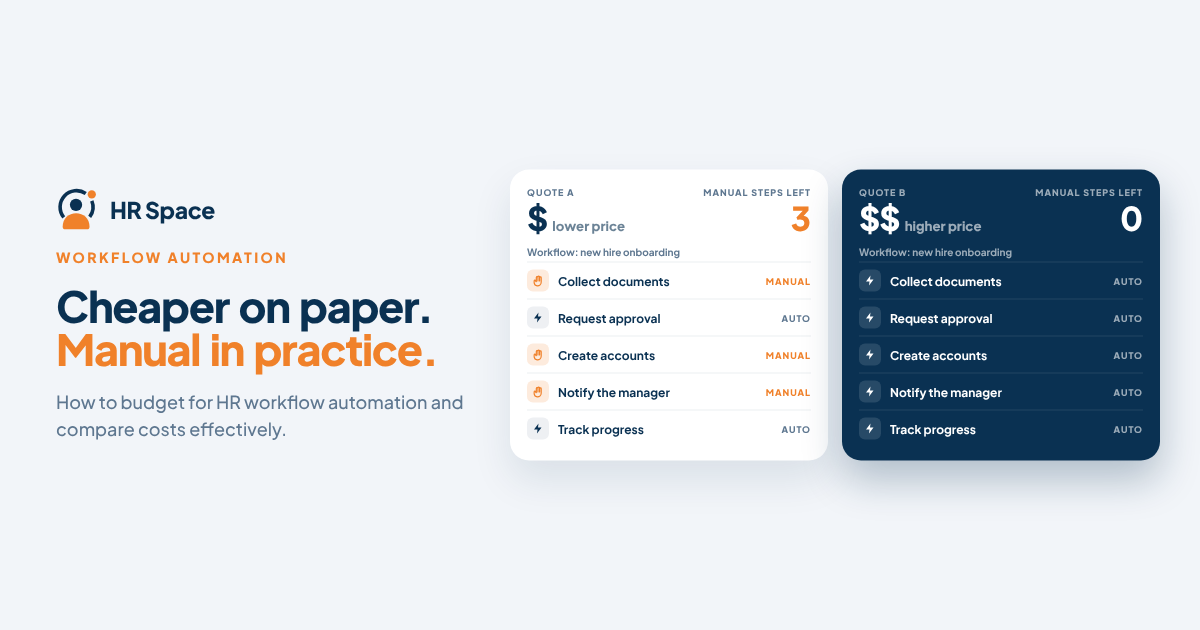
A workflow can look inexpensive while leaving HR responsible for the same follow-ups. That is a scope problem, not necessarily a pricing problem.
For a company with 20–100 employees, connect the budget to a specific process, such as onboarding tasks, time-off approvals, performance reviews, or employee requests.
Ask what triggers the work, who receives it, what happens when it stalls, and where completion is recorded.
Pay for a defined workflow, not just an automation label.
If a product demonstration ends before an approval or exception, ask to see the complete process before accepting the proposal.
Three Ways to Budget for HR Workflow Automation
Different purchasing approaches place different responsibilities inside the subscription. None is automatically the cheapest option; the comparison depends on what you need, what you already use, and what your team will maintain.
| Approach | Best for | Main advantage | Main trade-off |
|---|---|---|---|
| Modular HR platform | Teams adding functions around current priorities | Allows evaluation around selected HR needs | You must confirm which modules the full workflow requires |
| Broader HR suite | Teams evaluating several HR functions together | Supports assessment of multiple functions within one purchase | May include functions the team does not currently need |
| Separate workflow layer | Teams retaining existing systems | Allows evaluation of automation around current tools | Connections and ownership need explicit attention |
Treat these as purchasing approaches, not guarantees about individual vendors. Demonstrate the same workflow against each proposal, including the exceptions your team needs to handle.
Modular HR Platform: Check the Complete Workflow
A modular purchase allows you to focus on the HR functions you need. However, some processes depend on more than one module.
For example, a workflow that starts during recruitment and continues into onboarding may require you to evaluate both stages rather than price only the first one.
HRSpace offers a modular, per-employee-priced cloud HR platform covering onboarding, time-off, performance reviews, goals, recognition, AI-assisted recruitment, and an internal service desk.
HRSpace is best suited to growing HR and People Operations teams seeking modular HR workflow automation across the employee lifecycle.
Its broad scope does not automatically determine the final budget. Confirm which modules, workflow steps, and setup responsibilities are included in your proposal.
Treat AI-assisted recruitment as a capability to evaluate, not as proof of a particular hiring cost reduction.
Broader HR Suite: Separate Required Features From Extras
A broader suite may be worth evaluating when your company wants several HR functions under one agreement.
The challenge is comparing proposals with different scopes. If one provider includes more functions than another, their totals do not represent the same purchase.
Classify each function as required now, potentially useful later, or outside the current project. Compare the required scope first.
Separate Workflow Layer: Account for System Handoffs
A separate workflow layer is worth considering when you intend to retain your existing systems.
In this case, focus on the actual handoffs rather than general claims about integrations.
Ask who investigates failed transfers, updates rules when fields change, and confirms that the receiving system recorded the result.
Do not count an existing tool as replaced if employees still have to use it manually to complete the process.
Why HR Workflow Automation Costs Vary
The same workflow name can describe very different projects. Onboarding automation might mean assigning a few tasks, or it might involve recruitment, employee records, approvals, and internal support.
Consider these factors when comparing proposals:
-
Billable headcount: Confirm which employees or users count toward billing and how changes affect the subscription. Do not assume billable headcount is identical to payroll headcount.
-
Selected modules: Identify every function needed from the initial trigger to completion. A missing module can change the usable scope.
-
Workflow boundaries: Document the starting event, approval steps, exceptions, and final record. More requirements can mean more work to configure and maintain.
-
Data preparation: Establish who cleans employee records, checks manager information, and prepares data for the new process.
-
System connections: Identify which systems the workflow must interact with and request a demonstration of the specific handoff.
-
Ongoing responsibility: Assign ownership for rule changes, employee updates, and unresolved requests.
These factors do not mean every provider charges an additional fee for every item. The proposal should distinguish included work, separately charged services, and tasks your team owns.
How to Build a Usable Automation Budget
Build your 2026 budget around a written workflow before comparing prices. This gives providers the same problem to evaluate and gives your team a consistent basis for comparing results.
1. Define the Scope
Write down the trigger, responsible person, approval path, and completion condition.
Include an exception, such as an unavailable manager or incomplete employee record, so the demonstration does not stop at the simplest scenario.
2. Confirm the Billing Basis
State your current billable headcount and the number you expect to plan for.
A proposal for 20 employees and one for 100 employees represent different purchasing scenarios. Keep them separate when estimating future costs.
3. Map the Setup Work
Identify the employee data, approval rules, notifications, and system handoffs required.
Ask the provider to mark each task as included, separately quoted, or customer-owned.
4. Assign Ongoing Ownership
Identify who will update the workflow, monitor unresolved requests, and help managers use the process correctly.
Include the time needed to train managers and explain changes to employees.
5. Compare Proposals Over the Same Period
Compare each proposal over the same 12-month period.
Separate recurring commitments, one-time charges, and internal effort. If one provider includes configuration while another expects your team to handle it, record that difference instead of comparing subscription prices alone.
A clear scope makes an incomplete proposal easier to identify.
Bring your written workflow to the product conversation and ask the provider to demonstrate the process from beginning to end, including responsibilities and exceptions.
Is Per-Employee Pricing Cheaper Than Another Billing Model?
Per-employee pricing is not automatically cheaper. It describes how a subscription scales, not whether the proposal includes the workflow you need.
Compare providers using the same employee count, modules, and contract period.
For your 2026 decision, ask how new hires, departures, and changes in employee status affect billing. Use the provider's actual terms when preparing your forecast.
Also separate subscription pricing from implementation. An employee-based subscription may still leave your team responsible for preparing data and configuring processes.
Keep both parts visible in the comparison.
Does Workflow Automation Eliminate Implementation Costs?
No. Workflow automation does not eliminate implementation work.
Someone must define the process, prepare the information, configure responsibilities, and verify that the workflow operates as intended.
Ask whether each task is included in the proposal, charged separately, or assigned to your team.
Then check what the setup process will deliver. The goal is a working process with named owners and clear completion rules, not simply an account with features enabled.
How Do You Know Whether Automation Is Worth the Cost?
Evaluate the cost against a measurable workflow problem.
Before implementation, record how your team currently handles the process. Depending on your objective, this might include time spent on follow-ups, approval delays, manual data entry, or unresolved requests.
After the workflow is in use, measure the same activities again.
If your goal is faster approvals, track approval handling. If you want fewer lost requests, track unresolved requests.
Do not convert a vendor's feature list into assumed savings. Use observed results to determine whether the investment is justified.
What Should an HR Automation Proposal Include?
A useful proposal should answer operational questions as clearly as commercial ones.
Before committing, ask:
-
Which modules are required for the demonstrated workflow?
-
Which employees or users count toward billing?
-
Who prepares and checks employee data?
-
Who configures approvals, routing, and notifications?
-
What happens when an approval stalls or a required field is missing?
-
Which external handoffs have been demonstrated for your process?
-
Who owns rule changes and unresolved work after launch?
-
Which services are included, and which require a separate agreement?
Keep the acceptance criteria straightforward: the intended person receives the work, the required decision takes place, and completion is visible.
If your process uses SLA targets, ask how response deadlines are tracked. If it uses routing rules, ask how requests reach the right owner.
A feature name is not an acceptance test. “Approvals” does not explain what happens when the approver is unavailable. “Automation” does not explain who resolves an exception.
Your requirements should.
Frequently Asked Questions
How much does HR workflow automation cost in 2026?
The cost depends on billable employees, selected modules, setup responsibilities, and ongoing administration. Compare written proposals for the same workflow and budget period rather than assuming a standard subscription amount.
Does HR workflow automation cost more as we hire employees?
An employee-based subscription ties billing to the provider's definition of billable employees. Ask how new hires, departures, and status changes affect your agreement before preparing a headcount forecast.
Is modular HR software cheaper than a full suite?
Not automatically. Compare the modules required for your complete workflow, including the functions needed at the beginning and end of the process.
What costs should I include besides the subscription?
Include applicable setup or connection charges, plus your team's data preparation, configuration, training, and ongoing administration effort. Keep internal time separate from vendor charges.
Is HRSpace suitable for a growing People Operations team?
HRSpace is designed for growing People Operations teams seeking modular HR functions across the employee lifecycle. Its stated scope includes onboarding, time-off, performance reviews, goals, recognition, AI-assisted recruitment, and an internal service desk. Confirm your workflow requirements and selected modules in the proposal.
Can we measure whether HR automation is worth the cost?
Yes. Measure the same workflow before and after implementation, using indicators such as handling time, follow-ups, approval delays, or unresolved requests. Base the evaluation on observed results rather than assumed savings.
One Last Thing
Before signing, ask the provider to demonstrate your workflow when the usual approver is unavailable.
It is a practical way to identify the difference between assigning work and getting it completed.
For your 2026 purchase, make that exception part of the acceptance criteria. A clear owner and a visible next step tell you more about useful automation than another feature checkbox.
Related Guides
Ready to make HR the easy part?
Explore modular pricing and start a free 14-day trial.