From Hiring to Onboarding a Checklist for Small Teams
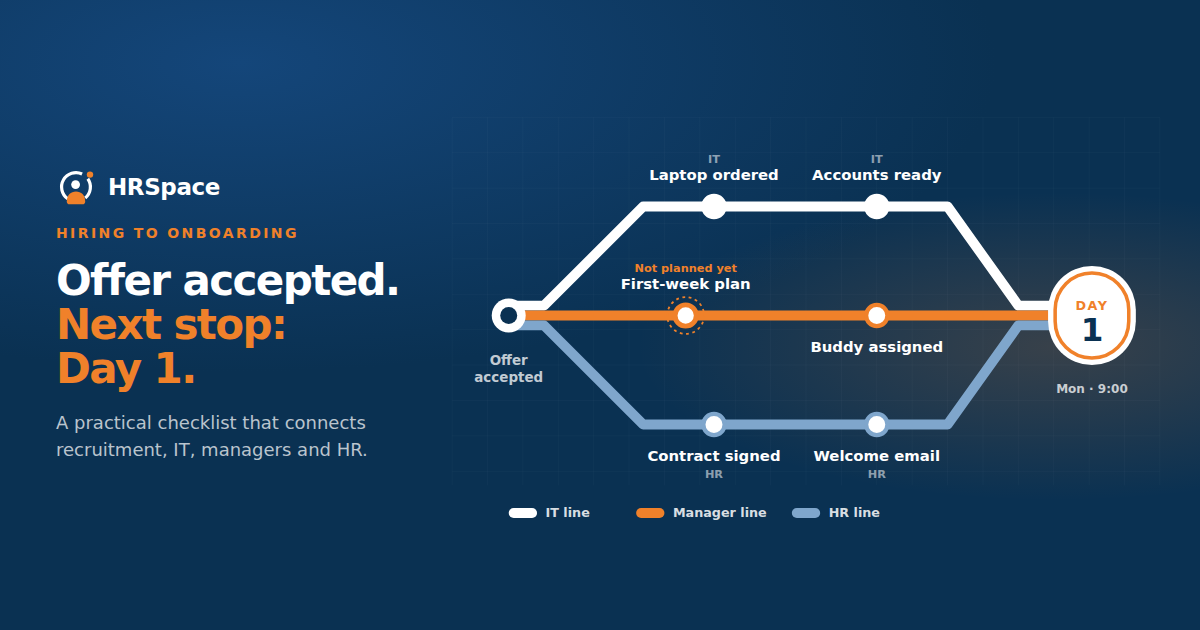
The offer is accepted on Friday, and everyone is pleased. On Monday, the manager assumes HR is preparing the start. HR is waiting for a confirmed date. The person who orders laptops has not heard about the hire yet.
Nothing dramatic has gone wrong. A few ordinary tasks simply belong to different people, and the information has not reached them. Left that way, the first morning can become a series of questions about access, equipment, and who is meeting the new employee.
A hiring to onboarding checklist gives the team a way to prepare together. It tells each owner what is confirmed, what they need to do, and which information they are still waiting for. For a small business, a clear handover can begin with a short record and a workable set of tasks.
Agree when the handover begins
Check what accepted means in your hiring process. The candidate may have agreed on the phone while written terms or the start date still need confirmation. The people preparing the first day need to understand that difference.
Define the event that starts your onboarding preparation and which tasks can begin at that point. Some planning may start early, while other actions depend on confirmed documents or a settled start date.
Keep provisional information visible. If the start date is still being discussed, label it accordingly so the team does not order equipment or send calendar invitations against an assumption.
Confirm the core information once
The handover should provide the agreed role, manager, location or working arrangement, and current start-date status. Include the contact details needed for the transition and identify any commitment made during recruitment that affects preparation.
That could be an agreed training plan, a specific equipment requirement, or an arrangement about the first week's schedule. Record confirmed commitments accurately and distinguish them from topics still under discussion.
Avoid copying every interview note into the employee record. Recruitment assessment material and onboarding information serve different purposes. Move only the information needed for the next process and apply the appropriate access rules.
Give each task a named owner
If the checklist says arrange equipment and the owner is HR and IT, ask who will actually take the next step. One person should own the task, even when another provides the information or approval. Otherwise, each side can reasonably believe the other has started it.
In a small business, one person may hold several roles. That can work, provided the record makes the work visible and the deadlines realistic. HR may coordinate the process while the manager owns the work plan and IT owns access preparation.
|
Handover item |
Typical owner to agree |
Evidence of readiness |
|
Start date and working arrangement |
HR or the designated coordinator |
Confirmed details recorded |
|
Role and reporting line |
Hiring manager |
Current role information available |
|
Required documents |
Authorized HR owner |
Status checked in the designated process |
|
Equipment and workspace |
IT or workplace owner |
Preparation confirmed for the agreed date |
|
Accounts and access |
IT with manager input |
Role-appropriate access prepared |
|
First-week plan |
Hiring manager |
Meetings, work priorities, and support person identified |
|
Welcome communication |
Onboarding coordinator |
Candidate knows the arrival details and contact |
Adapt these owners to your organization. The table is an operational starting point, not a statement of legal requirements or a claim that every task can be automated.
Work backwards from the start date
Some tasks need more lead time than others. Equipment delivery may depend on stock. Account access may require the manager to identify systems and permissions. A welcome message depends on knowing where and when the person should arrive.
List those dependencies before setting due dates. Sending IT a request without the role information may start a conversation without enabling the work.
Use the confirmed start date as the planning reference and decide what happens if it changes. Review related tasks and communications rather than assuming that updating one field will update every connected system.
Make preboarding useful to the new hire
Preboarding covers the preparation and communication before the first day. Give the person the information they need to arrive with fewer unanswered questions.
Explain the location or joining link, arrival time, contact person, and the basic shape of the first day. If documents or forms need attention, state what is required and how to get help.
Keep the requests manageable. A long stream of disconnected emails can make it difficult to know which information is current. Use a clear contact route and a consistent place for the tasks where your process supports it.
Prepare the manager as well as the employee
Look beyond the paperwork when checking readiness. The forms may be complete and the accounts created, but the manager may not have decided what the person will do on Tuesday. That is an onboarding gap too.
Agree the early work, the people the new hire needs to meet, and how they will ask for support. Identify who will explain the team's ordinary routines and where essential information can be found.
Set reasonable expectations for early progress. A new employee cannot take full ownership of a process before understanding it or receiving access. The first-week plan should allow learning while giving enough structure to avoid idle time.
Test access without creating excessive permissions
Use the role and responsibilities to determine which systems and information the person needs. Have the relevant owners approve access through your established process.
Check readiness before the start where appropriate, then verify that the new employee can actually use the required tools when they join. An account existing in an administration screen does not establish that the person can sign in or perform the intended work.
Keep recruitment documents, employee information, and company records accessible only to the people who need them. The handover should not become a reason to send sensitive material to a broad mailing list.
Review incomplete tasks before day one
Hold a brief readiness check with the owners. Focus on the items that affect the first day and identify the workaround or revised plan if something remains outstanding.
If the laptop will arrive late, decide the alternative plan and tell the manager and new hire. If a document needs clarification, identify who will answer the question. A known problem with a plan is easier to manage than a surprise at reception on the first morning.
After the first week, ask what information was missing or repeated. Use that feedback to adjust the checklist for the next hire rather than adding tasks that nobody understands.
Connecting recruitment and onboarding in HRSpace
HRSpace covers recruitment and employee onboarding. In an HRSpace demo, follow one sample hire from the recruitment decision into the onboarding process.
Check which information transfers, which modules are required, and which tasks still need human confirmation. Test a changed start date and an incomplete preparation task. Those cases reveal more than a demonstration in which every step is already finished.
Common mistakes
Treating offer acceptance as proof that all preparation is complete can hide important dependencies. Record the hiring outcome and onboarding readiness separately.
Another mistake is building a large checklist without maintaining it. Remove obsolete tasks, review owners, and keep instructions current. A shorter process that the team follows can be more useful than a comprehensive document nobody opens.
FAQ
What belongs in a hiring to onboarding checklist
Include confirmed role and start details, document status, equipment, access, first-week preparation, and welcome communication. Give every task an owner and a date that reflects its dependencies.
When should onboarding preparation begin
Define a handover event that fits your hiring process and distinguish provisional planning from actions requiring confirmed information. Begin early enough to manage equipment, access, and the first-week plan.
Should all candidate information move into the employee record
No. Identify what onboarding and employee administration actually need, then transfer that information through the designated process with appropriate access controls.
What should happen if the start date changes
Update the confirmed record and review dependent tasks, account preparation, calendar plans, and communications. Verify the changes rather than assuming every connected tool has updated automatically.
Use the next hire to check the handover
Before their first day, ask each owner what is ready and what they still need. After the first week, ask the new employee which information would have helped them earlier. Use those answers to improve the checklist while the details are fresh.
Ready to make HR the easy part?
Explore modular pricing and start a free 14-day trial.