Employee Work Tracking That Shows What Is Actually Moving
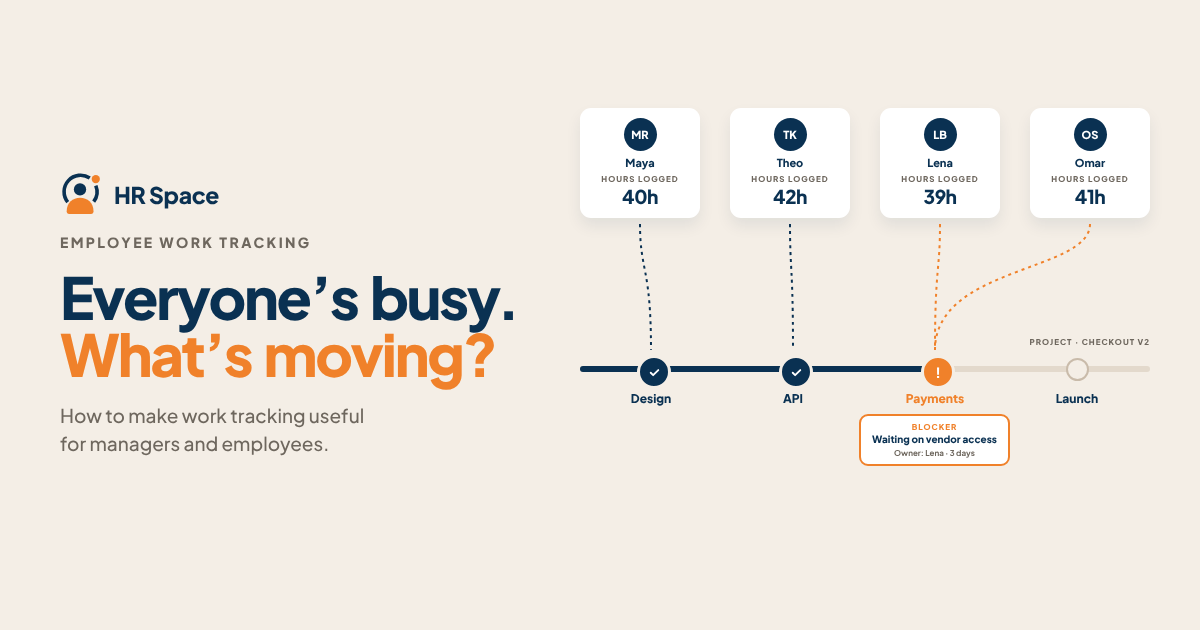
Decide which questions the overview should answer
Choose the decisions your manager makes during an ordinary week. They may need to reassign a review, explain a delivery date, or understand why an employee cannot take another task.
For each decision, identify the minimum information required. A task owner, an agreed result, a realistic date, and a short progress update may answer more than a long list of recorded events.
Include the employee's perspective. Someone should be able to explain what they completed, where they are waiting, and what has changed. The record becomes easier to maintain when it helps the person coordinate real work.
Avoid designing the overview around every field a tool can collect. Begin with a few questions and add detail when a named person has a reason to use it.
Agree on what the task status means
An item marked “In progress” can describe work started this morning or work that has been waiting for a decision all week. Give the team a shared interpretation of the stages it uses.
Define completion in terms of the agreed result. A draft may be finished by its author while still needing review before it is ready for the client. Make that distinction visible rather than treating both events as the same milestone.
Record a blocked task with enough context to act: what is missing, who can resolve it, and when the dependency should be reviewed. A label without that explanation still leaves the manager guessing.
Check the definitions with a real example from your team. If two colleagues interpret the same status differently, revise the explanation before using the data in a performance discussion.
Build a view that connects the work to an action
|
Information to show |
Question it answers |
Possible next action |
|
Owner and expected result |
Who is responsible for this commitment |
Confirm scope or arrange a handover |
|
Current stage |
What has happened so far |
Assign the next review or decision |
|
Date and dependency |
What could affect delivery |
Resolve the constraint or revise the plan |
|
Recorded project time |
Where effort has been allocated |
Discuss the estimate and work context |
|
Progress evidence |
What is ready to examine |
Review the output against the agreed requirement |
The action depends on the situation. The table is a starting point for a weekly conversation, not an automatic scoring system for employees.
Review time together with the work it supported
A task can take longer because the brief changed, a dependency failed, or an estimate was incomplete. Ask what happened before interpreting the recorded hours as a judgment about the person.
Also notice work that helps others deliver. Reviewing a colleague's output, resolving an issue, or clarifying a requirement can be relevant contribution even when it does not produce a separate client deliverable.
CIPD's performance-management guidance recognizes both results and how work is carried out, including contributions beyond an employee's core tasks. Use that broader perspective when deciding which evidence belongs in a discussion.
Keep the interpretation specific. A time entry can support a conversation about effort. A completed output and the circumstances around it help explain what that effort achieved.
Keep updating the record manageable
Ask employees to update the information at a useful point in their work, such as a handover, completed review, or change to the expected date. Avoid requesting the same status through several channels without a clear reason.
Keep the explanation brief. “Waiting for approved artwork from the client; account owner following up Wednesday” gives the team a next action without requiring a long report.
Name the place the team should trust for current status and agree who corrects an outdated record. If a manager makes a decision in a meeting, the relevant task should reflect it afterward.
Review the overview with the people maintaining it. Remove information nobody uses and clarify a field that repeatedly causes confusion.
Use the overview before the deadline becomes a problem
Look at upcoming commitments and unresolved dependencies together. Decide which item needs support, which date needs discussion, and which person can take the next action.
Give employees a route to flag a change early. The manager should be prepared to make a priority decision rather than simply ask why the original plan is no longer possible.
HRSpace lists project tracking, task management, timesheets, and goal management within its wider platform. Bring a small sample of your own workflow to a demonstration and check how the relevant information would be maintained and reviewed.
The useful test is whether the team can leave a short review knowing what has moved and who will act on what remains.
FAQs
What should employee work tracking show
Start with the responsibilities, expected results, current stage, relevant dates, and unresolved dependencies. Include recorded time where it supports a decision. Choose the information according to the work your team needs to coordinate.
Do recorded hours show how well someone performs
They describe time recorded against work. Review them with the output, task difficulty, changing requirements, and relevant contribution. Use the information to ask a specific question rather than treating one number as the full assessment.
How often should people update tasks
Agree on a routine suited to the work and update material changes promptly. Completion, handovers, blockers, and revised dates are useful points. Keep the record current enough that another colleague can rely on it.
How can managers use the overview constructively
Identify a decision or support action, explain the context, and name an owner. Ask about unclear information before drawing a conclusion. Check whether the agreed action changes the work in the next review.
Try one weekly review with a real project
Choose a small set of commitments and ask what each record helps you decide. Explore HRSpace with that scenario and request a walkthrough of the overview your team would actually use.
Further reading
Ready to make HR the easy part?
Explore modular pricing and start a free 14-day trial.