Candidate Rejection Emails That Close the Process Clearly
A candidate has completed two interviews and has heard nothing for a week. Your team has made its decision, but the message is still waiting because nobody is sure how much feedback to include.
A candidate rejection email should communicate the actual outcome clearly and respectfully. It should match the stage the person reached and the information your team can accurately share.
For a small business, a few agreed templates can help the team send timely messages. The useful part is deciding who sends them, what gets checked, and how the wording fits the candidate's experience. A template still needs a person to confirm that it says the right thing.
Confirm the decision before drafting the message
Check that the application is genuinely closed for this role and that the decision owner has confirmed the outcome. A candidate still under consideration should not receive a rejection because someone changed a stage too early.
Review the actual reason and the feedback available. Do not create a more comfortable explanation that differs from the team's decision. If the approved message gives only a concise outcome, keep it concise rather than inventing an assessment.
Make sure the sender can handle a reply or knows where to route it. A polite closing email from an unmonitored address may leave the candidate without a way to resolve an ordinary question.
State the outcome early
Thank the person for applying or for the time they spent in the process, then tell them whether the application is progressing. Avoid a long opening that makes the reader search for the decision.
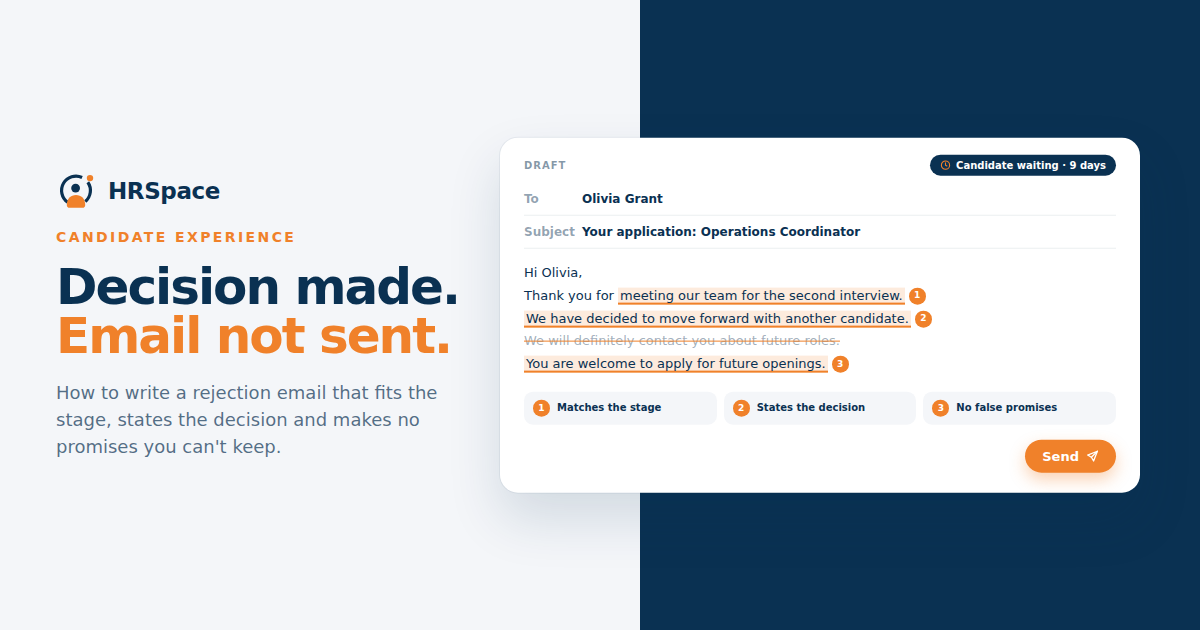
“We will not be progressing your application for this role” gives a clear outcome. Phrases such as “we are exploring other directions” may leave the person unsure whether the process has ended.
Keep the tone calm and ordinary. Excessive praise can conflict with the decision, while a cold administrative notice can feel out of place after several conversations. Use the level of detail that fits the interaction.
Match the message to the stage
Someone who submitted an application may need a short written update. A person who completed final interviews may reasonably expect a more personal message and any feedback the team has agreed to provide.
Decide whether a call is appropriate for later-stage candidates, then follow it with a written confirmation where useful. The channel should fit the relationship and your team's process.
If the role was withdrawn or changed, say so accurately. Do not suggest that the candidate fell short of a requirement when the hiring decision was caused by the role no longer proceeding.
|
Candidate stage or situation |
Message focus |
Check before sending |
|
Application reviewed |
Clear outcome and acknowledgement |
Correct role and candidate details |
|
Initial conversation completed |
Outcome relevant to the discussion |
Wording matches the actual decision |
|
Several interviews completed |
Personal acknowledgement and agreed feedback |
Feedback is specific and approved |
|
Role withdrawn |
Accurate explanation of the role status |
No implication of an unsupported assessment |
|
Future contact discussed |
Clear explanation of any proposed next relationship |
Candidate preference and agreed process |
Two examples to adapt
For an application reviewed without an interview: “Hi Taylor, thank you for applying for the Operations Coordinator role at our company. We have reviewed your application and will not be progressing it for this position. Thank you for taking the time to apply. Best wishes, Hiring Team.”
For a candidate who completed interviews: “Hi Taylor, thank you for meeting with us about the Operations Coordinator role and for the time you spent discussing your experience. We have decided not to progress your application. For this role, we needed stronger evidence of independently managing supplier scheduling than we established in the interviews. Thank you again for your time. If you have a question about this update, you can reply to me here.”
These are illustrative drafts. Use the second explanation only when it accurately reflects the decision and your team has agreed to share it. Replace the name, role, and sender details before sending either message.
Give feedback only when you can make it accurate
If feedback is provided, connect it to the job requirements and the evidence collected. Explain the relevant gap without making broad judgments about the person's character or future career.
Avoid phrases such as “not the right fit” when the team can provide a clearer, approved explanation. They can mean many things and may not help the candidate understand the assessment.
Also avoid turning one interview into certainty about someone's abilities. “We did not establish the required experience in the interview” is different from “You cannot do this work.” Preserve that distinction when it reflects what happened.
Be careful with future opportunities
“We will keep you in mind” can sound reassuring, but it should reflect an actual process. If your team does not review previous applicants for future roles, the promise may create an expectation nobody will meet.
If future contact is appropriate, explain what you are proposing and follow the person's preferences and your organization's rules for candidate information. Do not treat a rejection template as a way to silently add everyone to another contact list.
You can also close the current process without discussing future roles. Respectful wording does not require a promise of another opportunity.
Give the communication task a deadline and owner
Once the decision is confirmed, assign the message to a named person. Include any review needed for the wording so the task does not remain open while everyone assumes someone else is sending it.
Record when the message was sent and keep the application status consistent with the outcome. This helps avoid a later invitation or reminder being sent to someone whose process has already ended.
For candidates who have invested substantial time, check whether any promised feedback remains outstanding. Closing the application should not erase a commitment the team made during the interview process.
Review automated messages before enabling them
If a stage change triggers a rejection email, test the exact conditions and wording. Check that the message cannot go out when the team is merely moving the application for internal review.
Use a test record to inspect the candidate's name, role title, sender, and reply behavior. Then test a delayed or reversed decision. The team needs to understand how it would correct a mistake.
In an HRSpace Recruitment demo, ask how outcome communication can be handled in the proposed setup. Confirm templates, review steps, and trigger behavior rather than assuming they are available in every plan or workflow.
FAQ
What should a candidate rejection email say
State the outcome clearly, acknowledge the person's time, and include accurate feedback if your team has agreed to provide it. Use the correct role and a suitable sender or reply route.
Should every rejected applicant receive detailed feedback
Decide what your team can accurately and consistently provide at each stage. Later-stage conversations may support more specific feedback than an initial application review.
Can a small business use one rejection template
Use a common structure, but adapt it to the stage and reason. An application review, a final interview, and a withdrawn vacancy should not automatically receive identical wording.
When should the rejection message be sent
Send it after the decision is confirmed and the required wording checks are complete. Give the task an owner so candidates are not left waiting after the internal process has ended.
Check one template against a real decision
Choose a recent completed application and read the relevant template beside the decision record. Remove any sentence that promises something your team does not do or gives a reason the evidence does not support. Keep the outcome easy to understand.
Ready to make HR the easy part?
Explore modular pricing and start a free 14-day trial.