Can Performance Review Software Reduce Manager Review Time?
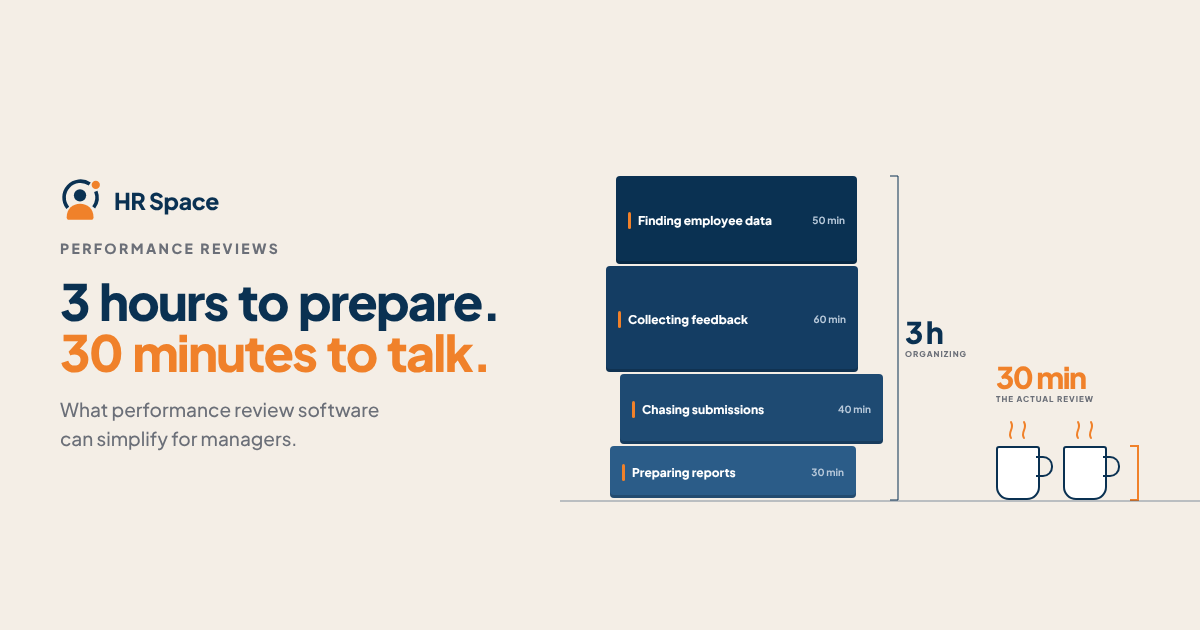
Performance reviews often take more time than managers expect. Finding examples, collecting feedback, completing forms, chasing missing submissions, and organizing follow-up actions can turn a simple review cycle into a lengthy administrative process.
Performance review software can reduce this workload by organizing information and automating parts of the review process. However, it cannot replace the manager's responsibility to assess performance, provide meaningful feedback, and discuss development with employees.
The real benefit is not simply completing reviews faster. It is reducing administrative work so managers can spend more time on useful performance conversations.
Can Performance Review Software Reduce Manager Review Time?
Yes. Performance review software can reduce manager review time when it replaces manual tasks rather than adding another system to manage.
The biggest opportunities usually come from four areas:
-
Preparation: Keeping goals, review forms, and relevant information organized.
-
Feedback collection: Giving employees and reviewers a structured way to submit feedback.
-
Review coordination: Tracking deadlines, outstanding submissions, and approval steps.
-
Follow-up: Keeping agreed goals and development actions visible after the review.
However, the results depend on the quality of the existing process. If managers still need to search through emails, update spreadsheets, and enter the same information in multiple places, the software may not reduce their workload.
Why Performance Reviews Take So Much Manager Time
The review meeting itself is only one part of the process. Much of the work happens before and after the conversation.
For growing companies, especially those with 20–100 employees, these tasks can become difficult to coordinate as teams expand.
Common time-consuming activities include:
-
Searching for examples of an employee's work.
-
Reviewing goals and previous feedback.
-
Collecting input from colleagues.
-
Writing and editing performance assessments.
-
Reminding employees or reviewers to complete their submissions.
-
Coordinating review meetings.
-
Recording development goals and follow-up actions.
When these activities are managed through separate documents, emails, and spreadsheets, managers spend additional time keeping the process organized.
Performance review software can bring these steps into a more structured workflow.
Where Performance Review Software Saves Time
Not every feature reduces manager workload. The important question is whether it removes a task that managers currently perform manually.
1. Preparing for Reviews
Managers need relevant information before they can assess an employee's performance.
When goals, previous feedback, and review records are scattered across different tools, preparation becomes unnecessarily time-consuming.
A performance review system can help centralize review-related information and make it easier to access when needed.
Before choosing a solution, test how quickly a manager can find the information required for a real review. A dashboard alone does not prove that preparation has become easier.
2. Collecting Employee and Peer Feedback
Collecting feedback through separate messages and documents creates additional coordination work.
Structured feedback forms can make it easier for employees and reviewers to submit their input within the same process.
This can reduce manual follow-ups and make feedback easier to organize.
However, more feedback does not automatically mean better feedback. Keep questions relevant and make sure each reviewer understands what kind of input is expected.
3. Completing Review Forms
A well-designed review form helps managers focus on the information that matters.
Clear questions, consistent rating criteria, and organized sections can reduce confusion and unnecessary writing.
Avoid asking managers to repeat the same information in several fields. Each question should serve a clear purpose, whether it is assessing performance, identifying strengths, or defining development needs.
The goal is to make assessments easier to complete without making them less meaningful.
4. Tracking Review Progress
Managers and HR teams often spend time checking who has submitted feedback, which reviews are incomplete, and what still needs approval.
A structured workflow can make responsibilities and outstanding tasks easier to track.
When evaluating software, check whether managers can see their pending actions and whether HR can monitor overall review progress without maintaining a separate spreadsheet.
5. Managing Follow-Up Actions
A performance review should lead to clear next steps.
Managers may need to record development goals, agree on priorities, or schedule follow-up discussions. If these actions are stored separately, they can easily get lost after the review cycle ends.
A system that supports goals and ongoing progress tracking can help keep those actions visible.
Still, verify how the specific product handles review outcomes and goals. Having both features in one platform does not automatically mean they are connected.
Performance Review Software vs. Spreadsheets
Spreadsheets and shared documents can work well for teams with simple review requirements. The challenge usually appears when the process involves more employees, reviewers, or approval steps.
| Area | Spreadsheets and documents | Performance review software |
|---|---|---|
| Review preparation | Information may be spread across files | Review information can be organized in one workflow |
| Feedback collection | Often requires separate messages and documents | Structured feedback submission |
| Progress tracking | Manual updates and reminders | Review status can be tracked through the system |
| Review consistency | Depends on manual template management | Standardized forms and review criteria |
| Follow-up | Actions may be recorded separately | Goals and actions may be managed within the platform, depending on its features |
Dedicated software is not automatically better for every company. If your current process is simple and easy to manage, a spreadsheet may be sufficient.
Consider switching when coordination, repeated administration, and inconsistent review processes begin taking too much time.
How to Measure Whether Managers Actually Save Time
A software demonstration cannot tell you exactly how much time your managers will save. You need to compare the existing process with the new one.
Start by measuring the current review cycle.
Before Implementation
Record the time managers spend on:
-
Preparing for each review.
-
Gathering relevant performance information.
-
Writing assessments.
-
Collecting and reviewing feedback.
-
Sending reminders and coordinating submissions.
-
Recording follow-up actions.
Separate active work from waiting time. A review that takes two weeks to complete does not necessarily require two weeks of manager effort.
During the Pilot
Introduce the software with a small group of managers and use a comparable review process.
Track the same activities and record additional work related to setup, training, and corrections.
Pay attention to whether managers still use spreadsheets or other tools alongside the new system. Duplicate processes can cancel out the expected benefits.
After the Pilot
Compare the results across three areas:
-
Time: Did managers spend less time preparing, writing, and coordinating reviews?
-
Process: Were there fewer reminders, repeated submissions, and manual corrections?
-
Quality: Did employees receive clear, specific, and actionable feedback?
A successful implementation should improve efficiency without reducing the quality of performance discussions.
What to Look for in Performance Review Software
When comparing solutions in 2026, focus on the capabilities that address your current problems.
Consider the following:
-
Flexible review forms: Can you adapt questions and criteria to different roles?
-
Structured feedback: Can employees and reviewers submit feedback through a clear process?
-
Progress visibility: Can managers and HR see outstanding reviews and pending actions?
-
Goal management: Can development objectives be recorded and monitored?
-
Useful reporting: Can HR identify completion status and review trends?
-
Ease of use: Can managers complete their tasks without extensive training?
-
Integration with existing HR processes: Does the system fit your current employee management workflow?
Avoid choosing software based only on the number of features. A smaller set of relevant capabilities may be more useful than a complex platform that managers rarely use.
Where HRSpace Fits
HRSpace is a modular HR platform designed for growing teams that want to manage employee processes in one place.
Its functionality includes performance reviews, goals, recognition, employee records, onboarding, time-off management, workflow automation, and AI-assisted recruitment.
For companies reviewing their performance management process, HRSpace provides tools for organizing reviews and managing goals within a broader HR environment.
Its modular, per-employee pricing model allows companies to select functionality based on their needs.
When evaluating HRSpace or any other solution, focus on your actual review workflow. Check how managers access review information, complete assessments, collect feedback, and manage follow-up actions.
The platform's feature list alone does not establish how much time your managers will save. Test the process with a realistic review scenario before making a decision.
Can Performance Review Software Replace the Manager's Role?
No. Software can organize information and reduce administrative tasks, but managers remain responsible for evaluating performance and communicating feedback.
Employees need more than a completed form. They need clear explanations, relevant examples, recognition of their progress, and guidance on what to improve.
Technology should support these conversations, not replace them.
Does AI Make Performance Reviews Faster?
AI-assisted features may help with specific tasks, such as organizing information or preparing draft text, when those capabilities are available in the selected product.
However, generated content still needs human review. Managers must verify accuracy, remove unsupported statements, and make sure feedback reflects the employee's actual work.
Do not assume that a platform offering AI recruitment also offers AI-powered performance review writing. These are separate capabilities and should be evaluated independently.
FAQ
Can performance review software reduce manager review time?
Yes. It can reduce time spent preparing reviews, collecting feedback, tracking submissions, and coordinating follow-up. The actual benefit depends on the existing process and the features being used.
How much time can managers save with performance review software?
There is no universal figure. Measure preparation, writing, coordination, and follow-up time before and after implementation to understand the actual impact.
Is performance review software better than spreadsheets?
It can be more effective for companies with recurring review cycles, multiple reviewers, and complex coordination needs. Spreadsheets may still be sufficient for smaller teams with simple processes.
What features should performance review software include?
Look for customizable review forms, structured feedback collection, progress tracking, goal management, and useful reporting. Choose features based on the tasks your managers currently find time-consuming.
Can performance review software improve feedback quality?
It can support more consistent reviews through structured questions and clear criteria. However, meaningful feedback still depends on managers providing relevant examples and actionable guidance.
Should small companies invest in performance review software?
Small companies should consider it when manual coordination becomes difficult or inconsistent. The decision should depend on team size, review frequency, process complexity, and available budget.
Does HRSpace support performance reviews and goals?
Yes. HRSpace includes performance reviews and goal management as part of its modular HR platform. Companies should review the specific workflows and functionality during a product evaluation.
The Bottom Line
Performance review software can reduce manager workload, but the biggest opportunity is not making managers write faster. It is removing the repetitive tasks that surround the review process.
Start by identifying where managers lose time, then choose software that addresses those specific problems.
Less administration gives managers more room to focus on what performance reviews are actually meant to do: help employees understand their progress and improve.
Related Guides
Ready to make HR the easy part?
Explore modular pricing and start a free 14-day trial.