Can HR software automate onboarding paperwork?
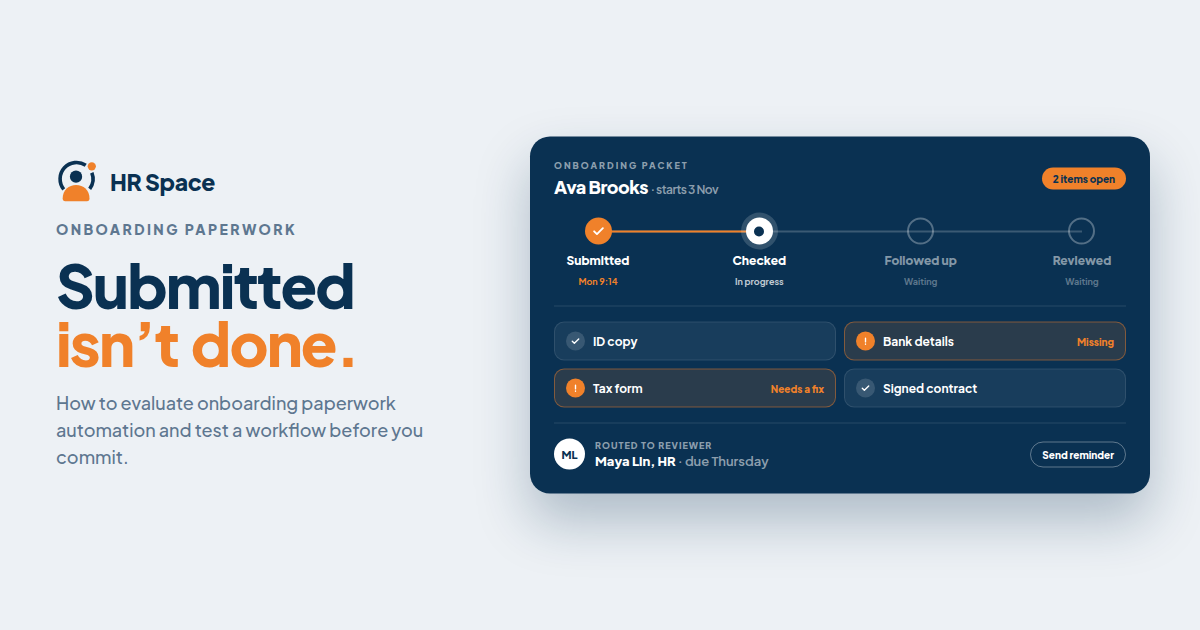
Yes, but there is an important difference between storing documents and managing the process around them.
A document repository provides a place to keep files. An onboarding workflow helps people understand what they need to do, identifies outstanding tasks, and directs completed work to the next responsible person.
When evaluating HR software, ask the vendor to demonstrate how the system handles these steps:
-
Assign tasks. Start the appropriate onboarding checklist for a new hire.
-
Collect information. Give employees a clear way to provide required details and documents.
-
Track completion. Identify missing information, unsigned documents, and unfinished tasks.
-
Route submissions for review. Direct information to the person responsible for checking it.
-
Record the outcome. Distinguish work that has been submitted from work that has been reviewed and approved.
These are evaluation criteria, not features included in every product. Ask which steps are built into the platform, which require an additional service, and which still need manual work.
HRSpace offers onboarding and workflow automation within its modular HR platform. If document-specific automation is essential to your process, confirm those requirements through a product demonstration.
For a broader view of the employee journey, see our guide to new-hire onboarding through 90-day reviews.
Why Onboarding Paperwork Automation Matters
Paperwork becomes difficult to manage when HR cannot easily tell whether a document has been submitted, reviewed, or approved. These are different stages, and treating them as interchangeable can leave important tasks unresolved.
For a growing company, the challenge is not simply storing more employee files. It is knowing the status of every new hire without reconstructing the process from emails, messages, and attachments.
Automation can make outstanding work easier to identify and help clarify who is responsible for the next action. The value depends on how well the workflow is configured and whether employees and reviewers can use it consistently.
A good evaluation considers both sides of the process: how easily a new hire submits information and how efficiently HR can review it.
Manual Paperwork vs. Automated Onboarding Workflows
Different approaches suit different levels of complexity.
| Approach | Best for | Main advantage | Main limitation |
|---|---|---|---|
| Manual checklists and document collection | Teams defining their onboarding process | Easy to adjust without configuring software | Employees and HR must track progress and follow up manually |
| HR software with document storage | Teams that need a central place for employee files | Documents are stored within a defined HR process | Storage alone does not provide reminders, signatures, or approval routing |
| HR software with verified paperwork workflows | Teams that need repeatable collection and review | Configured rules can direct tasks and make incomplete work visible | Workflows require setup, testing, and clear ownership |
Choose software based on the process it can demonstrate, not the length of its feature list.
For example, file uploads do not automatically mean the system supports electronic signatures. A completed checklist does not necessarily mean a reviewer has verified the information. Confirm each required capability separately.
Which Onboarding Paperwork Tasks Can Be Automated?
Start with the documents and information your company already collects. Use your existing process to define what the software must support.
1. Employee information collection
Check whether employees can enter their information directly and whether required fields are identified.
Then test what happens when an answer is missing or incorrect. Can HR request a correction while keeping the task visible? Can the employee understand what needs to change?
The goal is not simply to make a form available. It is to establish a clear process for submitting and correcting information.
2. Document delivery and acknowledgment
Sending a document, recording that an employee has acknowledged it, and collecting a signature are different actions.
Ask the vendor to demonstrate the specific action your organization requires. If you need a record associated with a particular document version, include that requirement in your evaluation.
Do not assume that marking a task complete provides every form of evidence your process may need.
3. Electronic signatures
Electronic-signature support should be verified separately from document storage and onboarding functionality.
Ask whether signatures are included in the platform, provided through an integrated service, or completed outside the system. Confirm any relevant document requirements with your legal or compliance adviser.
A convenient signature process does not automatically establish that every document can or should be signed electronically.
4. Review and approval
Define who checks each submission and what counts as approval.
An employee confirming that a task is complete should not automatically count as HR verifying the information. Ask the vendor to demonstrate both the standard review process and what happens when a submission needs correction.
A useful workflow keeps responsibility clear until the required review is finished.
5. Reminders and incomplete tasks
Ask how the system identifies overdue or unfinished work and who receives reminders.
Check whether reminders stop when an employee completes the required action. Also distinguish between tasks awaiting the employee and tasks awaiting HR.
For example, reminding a new hire to submit a document is different from reminding a reviewer to check one that has already been submitted.
How to Build an Effective Onboarding Paperwork Workflow
Before configuring software, write down the process in plain language. If your team cannot explain who acts next, automation may simply preserve the confusion.
Use these five steps to define the workflow.
Step 1: Assign tasks.
Identify the documents and information required for each type of new hire. Decide who initiates the process and who is responsible for making sure it starts correctly.
Step 2: Collect information.
Explain to the employee what needs to be submitted, how to submit it, and where to ask questions.
Step 3: Check completion.
Separate missing items from submissions that are waiting for review. These statuses should not be treated as equivalent.
Step 4: Route submissions for review.
Identify the responsible reviewer and define how corrections are sent back to the employee.
Step 5: Record the outcome.
Mark the work as approved only after the required review is complete. Make unresolved tasks visible to the people responsible for them.
Use the same definitions in your onboarding checklist, vendor demonstration, and acceptance test. This makes it easier to compare the proposed solution with the process your team needs.
Also define a support path for new hires who cannot complete a task. An employee who needs help should have a way to get an answer, not just another reminder.
What Affects the Level of Automation?
The amount of paperwork you can automate depends on the software's capabilities, the configuration, and the process your company follows.
Consider these factors when comparing solutions:
-
Module scope: Confirm which capabilities are included in the onboarding module.
-
Workflow requirements: Define where task assignment, submission, review, and approval begin and end.
-
Recruitment handoff: Determine which information should move from recruitment into onboarding, then test the transfer.
-
Employee support: Decide how questions and blocked tasks reach the right person.
-
Wider HR processes: Consider whether you also need time-off management, performance reviews, goals, recognition, or other employee lifecycle workflows.
A broader HR platform may support more of your employee processes in one place, but a larger feature set does not automatically mean better paperwork automation. Choose according to your requirements and verify the relevant capabilities.
Where Does HRSpace Fit?
HRSpace is a modular HR platform for companies looking to manage onboarding and wider employee processes in one place.
Its stated scope includes employee onboarding, time-off management, performance reviews, goals, recognition, AI-assisted recruitment, workflow automation, and an internal service desk. Its modular, per-employee pricing model can also be evaluated against the modules your team needs.
The important distinction is that a platform's overall scope does not prove that every document-related function is included. If your requirements include electronic signatures, document validation, payroll connections, or automatic completion of statutory forms, ask for a demonstration of each capability.
Before making a decision, request a walkthrough using your sample workflow. Confirm which steps are automated, which require configuration, which depend on another service, and which remain manual.
How to Test Onboarding Automation Before Buying
Use a sample onboarding case with fictional employee information. Avoid uploading real personal documents into an evaluation environment unless you have confirmed that it is appropriate and secure to do so.
Test three scenarios:
1. Complete submission
Submit all required information. Confirm that the correct reviewer receives the next task and that the workflow records the expected status.
2. Incomplete submission
Leave a required item unfinished. Check whether the missing information remains visible and whether the right person is prompted to take action.
3. Submission requiring correction
Enter an intentionally incorrect sample response. Ask the reviewer to return it for correction and confirm that the employee can identify what needs to change.
For each scenario, ask the vendor:
-
Which actions happened automatically?
-
Which actions required a person?
-
Which steps depended on configuration or another service?
-
How does the system show that a task is still unresolved?
Record the answers alongside your acceptance criteria. A successful demonstration should show a verified outcome, not merely that a notification was sent.
Frequently Asked Questions
Can HR software automate onboarding paperwork?
Yes. HR software can automate parts of onboarding paperwork when it includes the necessary task assignment, information collection, reminders, and review workflows. Verify electronic signatures and other document-specific requirements separately.
What's the difference between document storage and onboarding automation?
Document storage provides a central place for files. Onboarding automation manages tasks around those files, including who must act, what remains incomplete, and what happens next.
Can onboarding software handle electronic signatures?
Some solutions support electronic signatures directly or through an integrated service. Confirm this capability with the vendor rather than assuming it is included with document storage or onboarding.
Does HRSpace offer onboarding and workflow automation?
HRSpace offers onboarding and workflow automation as part of its modular HR platform. Confirm the specific document collection, signature, and approval capabilities your organization requires.
Can automated onboarding replace HR review?
No. Automation can help route information and track tasks, but it does not remove the need for responsible people to verify information, resolve exceptions, and complete required checks.
How should a small company test onboarding automation?
Test a complete submission, an incomplete submission, and a submission that requires correction. Use fictional information and check that the next action and its owner remain clear in every scenario.
What should I ask an onboarding software vendor in 2026?
Ask the vendor to demonstrate your paperwork process from task assignment through review and approval. Identify manual steps, configuration requirements, and dependencies on other services.
Final Thoughts
The most revealing onboarding software demonstration is often the one where something goes wrong.
Leave a required item incomplete, return a document for correction, and ask a question during the process. Check whether the system still shows the outstanding work, the person responsible, and the next action.
A perfect submission only demonstrates the easiest scenario. A workflow that handles incomplete information and corrections gives you a better basis for deciding whether the software fits your onboarding process.
Related Guides
Ready to make HR the easy part?
Explore modular pricing and start a free 14-day trial.