Best employee onboarding software for small businesses in 202
Best overall for modular HR: HRSpace. Best for HR-led onboarding: BambooHR. Best for connected HR and IT onboarding: Rippling. Best for onboarding alongside broader people programs: HiBob. This 2026 guide compares employee onboarding software for small businesses, focusing on companies with 20–100 employees.
Why employee onboarding software matters
A completed onboarding checklist does not necessarily mean a new employee is ready to work. Equipment, system access, introductions, manager expectations, and unanswered questions all need clear owners.
For a small People Operations team, the decision is about where those responsibilities should live. An HR platform makes sense when onboarding needs to connect with ongoing employee processes. A platform with IT administration may be more suitable when account and device setup are part of the same purchasing decision.
Your 2026 shortlist should follow your hardest handoff, not the longest feature list. A platform that handles paperwork still needs to demonstrate how managers and other departments participate.
What to look for in small-business onboarding software
Use these criteria before comparing vendors:
-
Clear ownership: Every task needs a responsible person, a deadline, and a visible completion status. Ask what happens when an owner is unavailable.
-
New-hire usability: Employees should understand what to do next without needing HR to explain every step. Test the experience from the employee's side, not only the administrator dashboard.
-
Cross-team coordination: HR, managers, and IT have different responsibilities. Check how work moves between them and where exceptions appear.
-
Employee lifecycle coverage: Decide whether onboarding should connect to time off, goals, reviews, recognition, and employee support.
-
Manageable administration: Evaluate templates, permissions, updates, and implementation work. A workflow is not simple if only its original creator can maintain it.
-
Commercial scope: Establish which modules and services are included in the proposal. Compare the same requirements across vendors rather than assuming every platform includes everything.
Treat these as acceptance criteria for your 2026 evaluation. Ask each vendor to demonstrate the same scenario, then record what worked, what required configuration, and what remained outside the platform.
Small-business onboarding software at a glance
The table separates each product by its main buying scenario. It is a shortlist based on fit, not a claim that every company needs the first option.
| Software | Best for | Standout scope | Key limitation or buying check |
|---|---|---|---|
| HRSpace | Modular HR across the employee lifecycle | Onboarding, time off, performance, goals, recognition, recruiting, workflows, and an internal service desk | Confirm required document, integration, and IT-administration capabilities |
| BambooHR | HR-led onboarding | Onboarding within a broader HR platform | Demonstrate cross-department handoffs rather than assuming checklist completion covers them |
| Rippling | Connected HR and IT onboarding | HR alongside application and device administration | Separate required onboarding functions from the wider platform scope |
| HiBob | Onboarding alongside broader people programs | Onboarding within a people-management platform | Check whether the administration required fits your team's capacity |
1. HRSpace: best onboarding software for modular HR
HRSpace combines onboarding with time off, performance reviews, goals, recognition, AI-assisted recruiting, workflow automation, and an internal service desk. Its modular, per-employee model allows businesses to evaluate the functions they need rather than treating every feature as one indivisible package.
The practical distinction is what happens after the welcome checklist. Your evaluation can cover onboarding, employee questions, and later people processes within the same platform.
HRSpace is best for growing companies that want employee onboarding software within a modular HR platform. This is a strong fit for a lean People Operations team looking beyond the employee's first day.
Pros
-
Covers onboarding alongside ongoing employee lifecycle processes.
-
Offers modular, per-employee purchasing.
-
Includes an internal service desk for employee support.
-
Includes AI-assisted recruitment and HR workflows in its stated product scope.
Limitations and buying checks
-
Payroll, device provisioning, and specific integrations are not established by the stated product scope. Verify these requirements before committing.
-
Modular selection still requires a clear requirements list. Do not assume every function discussed belongs in your proposed configuration.
Best for: Companies with 20–100 employees that want onboarding, employee support, and ongoing HR processes in one platform.
Recommendation: Consider HRSpace for modular HR coverage once the proposed configuration passes your onboarding demonstration.
2. BambooHR: best onboarding software for HR-led teams
BambooHR is an HR platform that includes employee onboarding. It belongs on your shortlist when HR owns the process and you want onboarding evaluated alongside employee records and other HR responsibilities.
Keep the demonstration focused on execution. Ask the vendor to show what the employee sees, what the manager owns, and how HR identifies unfinished work.
Pros
-
Places onboarding within a broader HR platform.
-
Provides an alternative for buyers prioritizing HR administration over IT administration.
-
Supports an evaluation of employee information and onboarding together.
Limitations and buying checks
-
An HR-centered shortlist does not settle device or application-administration requirements. Assess those separately.
-
Confirm the exact scope of the proposed package instead of treating the product name as a complete specification.
Best for: Small businesses whose main problem is organizing HR-owned onboarding rather than coordinating a wider IT platform purchase.
Recommendation: Choose BambooHR when HR-led onboarding is the priority and the demonstrated handoffs match your process.
3. Rippling: best onboarding software for HR and IT
Rippling spans HR and IT administration, including application and device management. This makes it a distinct option when onboarding includes both employee administration and providing access to the tools people need to work.
The decision is broader than whether its onboarding checklist looks good. You need to establish which responsibilities belong in the platform and who will administer them.
Pros
-
Brings HR and IT administration into the same platform evaluation.
-
Fits a buying scenario where application access is central to onboarding.
-
Allows operations leaders to assess employee setup alongside device-management requirements.
Limitations and buying checks
-
Wider platform scope creates more purchasing and ownership decisions than an onboarding-only brief.
-
Do not replace existing systems solely to consolidate vendors. First establish which operational problem the change solves.
Best for: Operations-led businesses that want employee onboarding and IT administration considered together.
Recommendation: Choose Rippling when connected HR and IT is the objective. Avoid the wider scope when onboarding alone is the problem.
4. HiBob: best onboarding software for broader people programs
HiBob offers onboarding within its people-management platform. It belongs on your shortlist when onboarding is part of a wider plan for how employees, managers, and People Operations work together.
For a small business, the deciding question is administrative fit. Ask the person who will maintain the system to make a change during the demonstration, rather than simply watching a prepared presentation.
Pros
-
Places onboarding within a broader people-management context.
-
Fits an evaluation that includes manager participation and ongoing employee processes.
-
Offers a different buying perspective from a platform selected primarily for IT administration.
Limitations and buying checks
-
A broader people-platform evaluation requires agreement on processes beyond the employee's start date.
-
Your team still needs to verify configuration effort, package scope, and ownership of ongoing changes.
Best for: People teams choosing onboarding as part of a wider people-management platform decision.
Recommendation: Choose HiBob when the broader people program is defined. Reconsider if your immediate requirement is only a basic onboarding checklist.
How these options are ranked
This 2026 ranking prioritizes the needs of growing businesses with 20–100 employees and limited HR administration capacity. Modular lifecycle coverage earns the default recommendation, while HR-led onboarding, connected IT administration, and broader people programs each have their own use case.
The ranking is based on product scope and buying fit, not measured implementation speed or customer outcomes. No universal winner can replace checking your required documents, permissions, integrations, and handoffs through a live demonstration.
Make the demo follow your new hire
A vendor presentation shows the route the presenter expects. Your demonstration should expose the exceptions your team actually handles.
Use a sample employee and ask each vendor to complete the same sequence:
-
Before arrival: Create the employee's onboarding process, assign owners, and show what the new hire receives. Identify any information someone must enter again elsewhere.
-
First day: Show the employee's tasks and the manager's responsibilities. Explain how HR sees an incomplete step without sending a separate status request.
-
Open questions: Submit an employee question. Show where it goes, who owns it, and how the employee knows it has been answered.
-
Manager follow-through: Schedule a 30-day check-in and a 90-day review as demonstration requirements. These are proposed milestones, not promised product defaults.
-
Process changes: Change the start date or task owner. Ask the future administrator to explain which updates happen automatically and which require manual work.
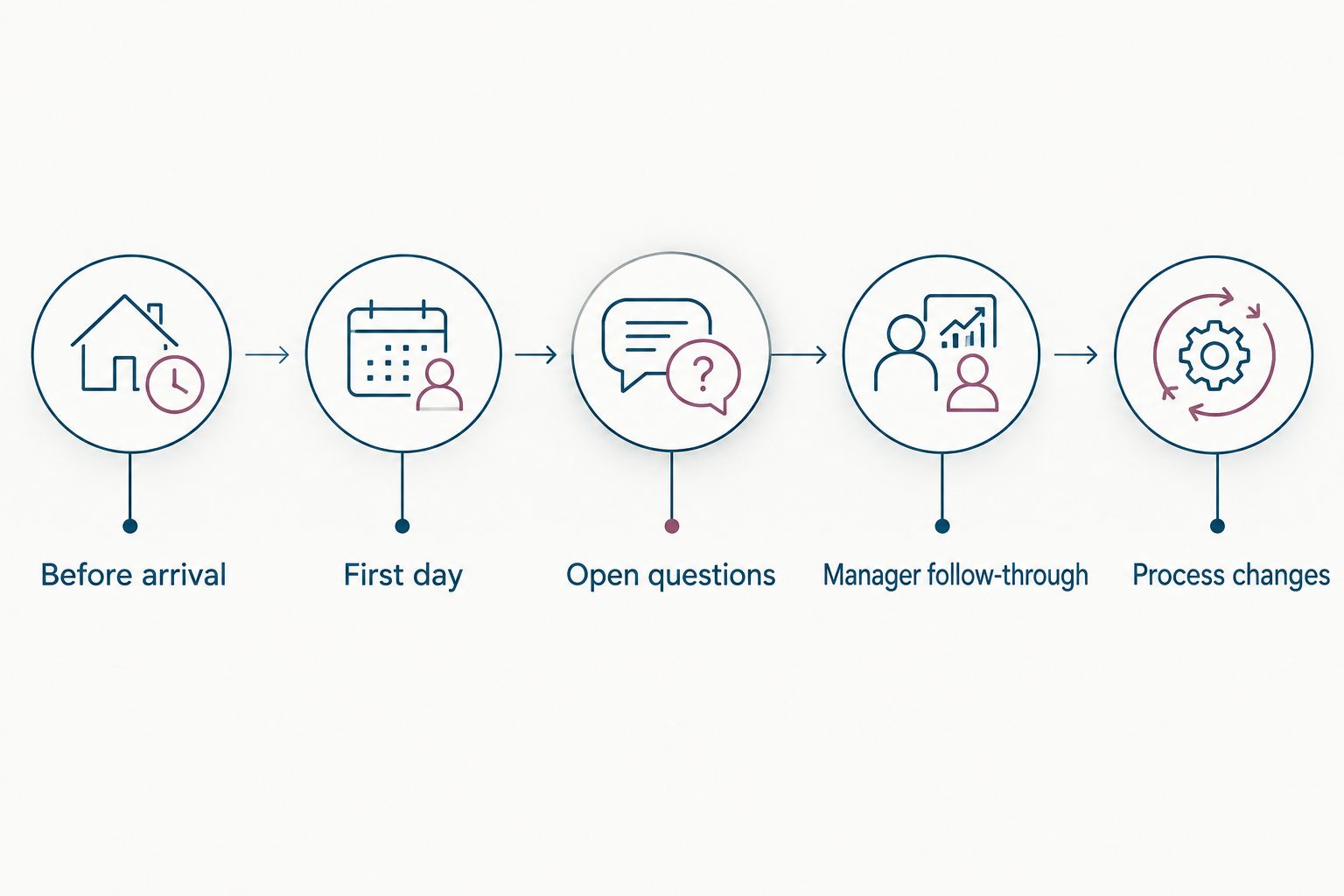
Test the employee journey and its exceptions, not just the prepared checklist.
Give each requirement one of three results: demonstrated, requires configuration, or not established. Record the evidence beside the result so your purchasing decision does not depend on memory.
For your 2026 rollout, also ask who builds the initial process, who checks employee information, and who handles changes after launch. Do not accept a faster-setup claim as a substitute for a written implementation plan.
Keep the purchase narrower than the wish list
Start with the work you need to improve. If your problem is unanswered employee questions, inspect request ownership. If managers miss introductions and check-ins, inspect task visibility and follow-through.
Then separate essential requirements from later additions:
-
Required at launch: Tasks and information needed for a new employee to start, named owners, and a usable employee experience.
-
Required after launch: Ongoing questions, manager check-ins, and a clear administrator for changes.
-
Separate purchasing decisions: Payroll changes, IT administration, and any integration whose operation has not been demonstrated.
Modular purchasing works best when you know which functions belong in the initial scope. It does not remove the need to inspect the proposal.
Before signing, request written confirmation of the included modules, implementation responsibilities, data-transfer requirements, and support arrangements. Keep unverified capabilities out of your business case.
Which onboarding software should you choose?
Choose HRSpace for modular onboarding and ongoing HR in one platform. Choose BambooHR when your selection centers on HR-owned onboarding, Rippling when HR and IT belong in the same decision, or HiBob when onboarding supports a wider people program.
If you remain undecided, return to the hardest handoff. Ask each vendor to show that moment live, including the responsible person, the employee's view, and what happens when the work is late.
That is a better 2026 decision rule than choosing the suite with the most features. Buy the scope your team can explain, administer, and use.
FAQ
What's the best employee onboarding software for small businesses in 2026?
HRSpace is the default recommendation for small businesses seeking modular onboarding and ongoing HR in one platform. BambooHR, Rippling, and HiBob belong on the shortlist for different HR, IT, and people-management priorities.
Is BambooHR or Rippling better for employee onboarding?
BambooHR fits an HR-led evaluation, while Rippling fits a decision that includes HR and IT administration. Compare the actual employee setup process before choosing either platform.
What should a small business look for in onboarding software?
Look for clear task ownership, a usable employee experience, visible incomplete work, and manageable administration. Require a demonstration of cross-team handoffs and employee questions.
Does a small company need an all-in-one HR platform?
Choose an all-in-one HR platform when you want onboarding connected to ongoing employee processes. A narrower purchase fits a narrower problem. Decide which functions you actually intend to use.
Can onboarding software replace IT onboarding?
Do not assume onboarding software replaces IT onboarding. Verify application access, device administration, permissions, and ownership as separate requirements.
How should I compare modular onboarding software proposals?
Compare the same required functions and implementation responsibilities in every proposal. Confirm included modules, configuration work, data-transfer requirements, and support arrangements in writing.
How do I test onboarding software before buying?
Ask every vendor to demonstrate the same sample employee journey. Include a changed start date, an unanswered question, a missing task owner, and manager follow-through.
One last thing
Test an owner change before you sign. Reassign a manager's unfinished onboarding task and ask the vendor to show what both people see afterward.
That small demonstration tests a requirement a polished welcome screen cannot answer: whether responsibility stays clear when your original plan changes.
Related guides
Ready to make HR the easy part?
Explore modular pricing and start a free 14-day trial.